
Introduction to AI-Powered Task Automation
Understanding the Role of AI in Project Management
Artificial intelligence is revolutionizing project management by enabling smarter task automation. AI algorithms analyze patterns in project data and automate repetitive processes, reducing manual effort. This technology enhances decision-making through predictive insights and optimizes resource allocation. AI serves as a powerful assistant for project managers to increase efficiency and maintain better control over complex projects.
Benefits of Automating Tasks in Project Software
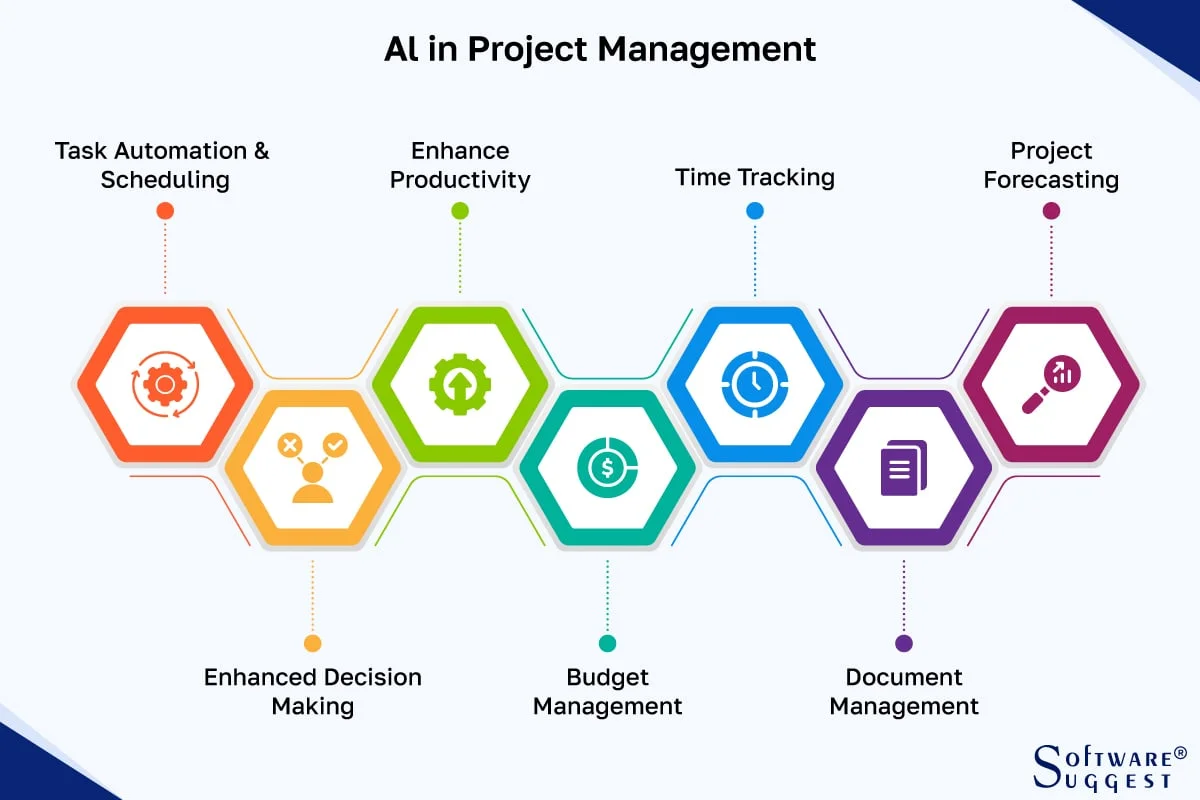
Automating tasks within project management software saves time and reduces human error. Routine activities such as scheduling, status updates, and data entry become seamless, freeing teams to focus on strategic work. Automation improves visibility by consolidating progress data and accelerates risk detection. Overall, it enhances productivity, streamlines communication, and supports data-driven decision-making, ultimately leading to smoother project execution.
Planning Your AI Automation Strategy
Identifying Repetitive Tasks for Automation
The first step is recognizing which tasks are repetitive and rule-based, making them ideal for AI automation. These may include reporting, assigning tasks based on workload, sending reminders, and updating project statuses. Understanding where these bottlenecks occur can help prioritize which processes to automate, ensuring the best return on investment and immediate improvements in project flow.
Setting Clear Objectives and Outcomes
Defining precise goals is essential before implementing AI automation. Project teams must clarify what success looks like by establishing measurable objectives such as reducing administrative time, improving deadline adherence, or enhancing risk management. Clear outcomes guide the design and configuration of AI tools to address specific challenges effectively and avoid scope creep.
Essential Tools and Technologies
AI Capabilities Integrated with Project Management Platforms
Modern project management platforms increasingly embed AI functionalities like predictive analytics, automated task assignment, and real-time reporting. These built-in features enable users to harness AI without switching systems. Look for software offering machine learning-driven resource optimization and automated risk detection to maximize project oversight.
Third-Party Automation Tools Compatible with PM Software
Beyond native capabilities, third-party tools expand AI automation possibilities through integrations. Workflow automation apps connect project management platforms with communication and documentation systems, enabling seamless task triggers and data synchronization. Leveraging these tools can customize automation beyond standard offerings to fit unique project needs.
Step 1: Selecting the Right Project Management Software
Key Features to Look for in AI-Powered Tools
Choosing software requires evaluating AI functionalities aligned with your project goals. Essential features include intelligent task creation, predictive scheduling, risk identification, and automated reporting. Consider vendor support for integrations and ease of customization. Scalability and user-friendly interfaces also contribute to successful adoption.
Comparing Popular Solutions and Their Automation Options
Popular project management software varies in AI sophistication. Some focus on scheduling and resource allocation, while others emphasize risk analytics and communication automation. Conduct comparisons based on functionality, pricing, and compatibility with your existing workflow to select the best fit. User reviews and case studies offer valuable insights into real-world performance.
Step 2: Designing Your Automation Workflow
Mapping Out Task Dependencies and Triggers
Creating effective automation starts with mapping task sequences and identifying dependencies. Understanding how tasks link ensures AI triggers execute correctly and processes flow smoothly. Define which events initiate automation, such as task completion, deadline changes, or status updates, to maintain alignment with project milestones.
Configuring AI to Handle Conditional Logic and Alerts
AI-driven automation should incorporate conditional logic to manage complex scenarios. For instance, AI can assign tasks differently based on team availability or flag high-risk activities for immediate attention. Setting up alert mechanisms ensures prompt notifications for exceptions or delays, enabling proactive issue resolution.
Step 3: Implementing AI-Driven Task Automation
Setting Up AI Rules and Permissions
Implementing automation involves defining AI rules that govern task assignments, priority settings, and resource use. Establish permission levels to control who can modify automation settings to maintain oversight. Clear governance prevents misconfiguration and ensures automation aligns with organizational policies.
Integrating Automation with Existing Project Workflows
Seamlessly integrating AI automation into current workflows minimizes disruption. Coordinate with team members to map automation onto existing processes and tools. Training and documentation help teams adapt, promoting smooth transition and maximizing automation benefits without losing project continuity.
Step 4: Testing and Refining Your Automation
Conducting Pilot Runs and Monitoring Performance
Testing automation on a small scale helps identify gaps and unexpected behaviors. Pilot runs allow teams to observe AI interactions within real project settings and gather performance data. Monitoring key metrics such as time saved, error rates, and user satisfaction guides refinement efforts.
Adjusting AI Parameters Based on Feedback
Continuous improvement is crucial. Use feedback from users and performance data to tune AI parameters. Adjust task assignment rules, alert thresholds, and reporting frequency to better fit team dynamics and project complexity. Ongoing refinement ensures automation remains relevant and effective over time.
Step 5: Scaling Automation Across Projects
Expanding AI Use to Boost Productivity
Once automation proves successful, extend it across multiple projects to multiply benefits. Scaling allows organizations to standardize processes, reduce manual effort, and enhance consistency. Broader adoption supports cross-project visibility and strategic resource allocation.
Training Team Members to Leverage Automation Effectively
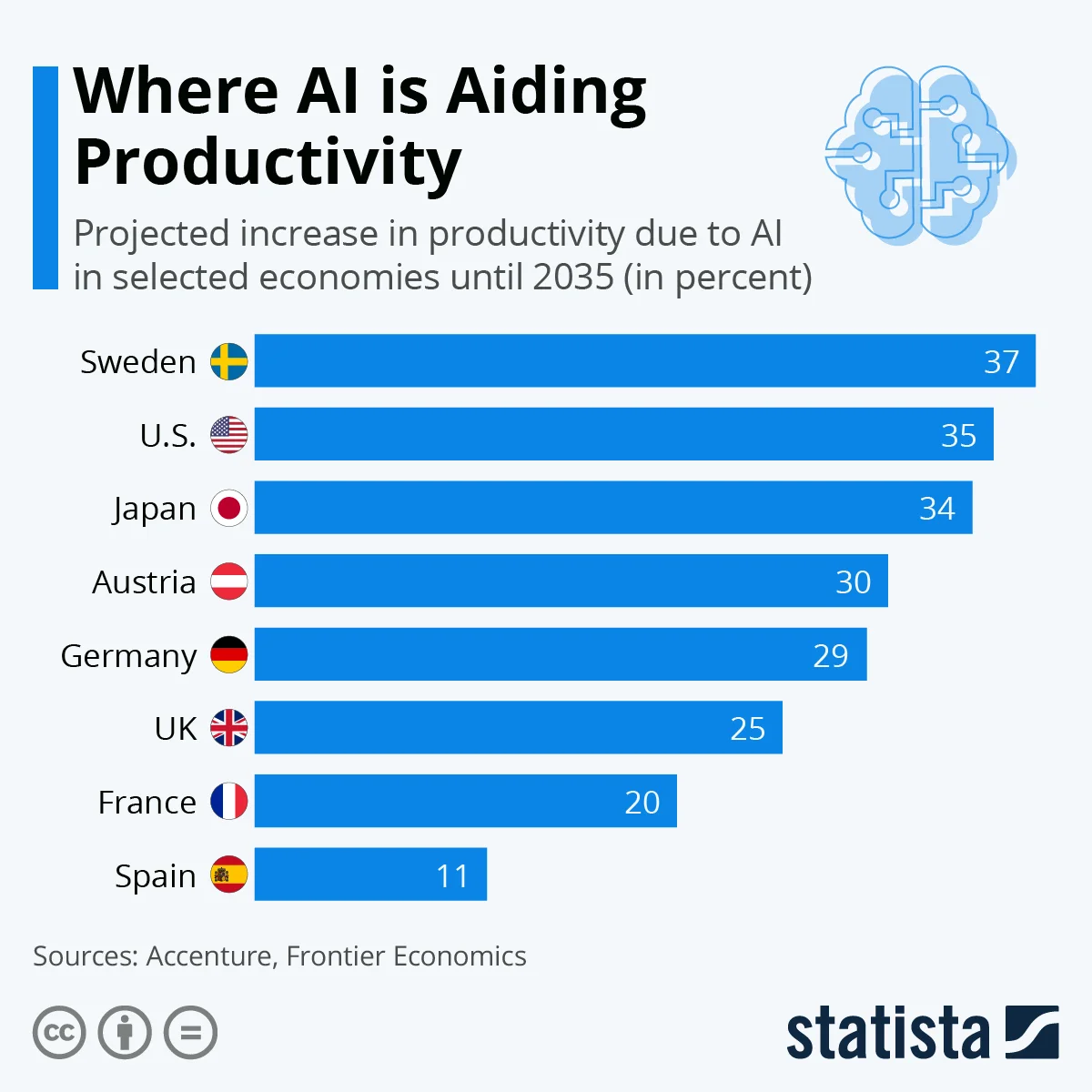
Empowering teams with the knowledge to use AI automation tools maximizes impact. Provide training sessions and resources focusing on how to interpret AI insights, customize automation, and troubleshoot issues. Skilled users can better integrate AI into daily routines, driving higher productivity and collaboration.
Future Trends in AI and Project Management Automation
Emerging AI Features to Watch For
The future promises more advanced AI capabilities such as natural language processing for automated meeting summaries and AI-driven decision support that simulates outcome scenarios. Adaptive AI that learns from evolving project dynamics will provide even more personalized recommendations and predictive analytics.
How Automation Will Transform Project Collaboration
Automation is set to enhance collaboration by breaking down silos with real-time data sharing and intelligent task coordination. AI-powered tools will facilitate seamless communications, align goals dynamically, and reduce administrative overhead, allowing teams to focus on innovation and problem-solving.


