
Understanding the Role of ChatGPT in Customer Support
What is ChatGPT and How It Works
ChatGPT is an advanced AI language model designed to understand and generate human-like text based on the prompts it receives. In customer support, it acts as a virtual assistant, interpreting customer inquiries and delivering relevant responses almost instantly. For example, a retail website can deploy ChatGPT to answer frequent questions about shipping policies or return procedures without a human agent’s involvement. The underlying technology enables it to process natural language, making the interaction feel intuitive and conversational.
However, ChatGPT’s effectiveness depends heavily on how it is integrated and trained within a specific support environment. It can pull from preloaded company data or knowledge bases, and, when connected via APIs, it can enhance support software with timely suggestions and accurate summaries, streamlining the workflow for human agents.
Benefits of AI-Powered Customer Support
One of the most tangible benefits of integrating ChatGPT into customer support is the dramatic reduction in response times. Customers today expect rapid assistance, often around the clock. AI-powered chatbots meet these demands by providing instant replies to common inquiries, even during peak hours or off-business times. This not only improves customer satisfaction but also alleviates pressure on human agents who can then focus on complex cases.
Moreover, ChatGPT can deliver personalized experiences by referencing customer history and preferences, creating a more engaging interaction than traditional rule-based bots. Businesses also benefit from cost savings since fewer live agents may be needed to handle routine questions. Lastly, the AI system’s ability to analyze sentiment and prioritize tickets helps ensure urgent issues get swift attention, further elevating service quality.
Step-by-Step Guide to Integrate ChatGPT in Your Support System
Assessing Your Current Support Workflow
Before implementing ChatGPT, it’s critical to evaluate your existing customer support processes. Start by identifying repetitive questions that consume substantial agent time. For instance, a software company might find that queries about installation guides or account resets dominate its ticket queue. Understanding peak inquiry periods and customer preferences regarding communication channels can also shape how ChatGPT will be deployed.
This assessment helps set realistic goals for the AI integration, such as reducing average response time by a certain percentage or increasing customer satisfaction scores. Additionally, understanding gaps in your workflow, such as lacking escalation methods for complex issues, ensures that ChatGPT will complement, not disrupt, your support system.
Setting Up ChatGPT: Tools and Platforms
Once the assessment phase is complete, the next step is selecting tools and platforms that support ChatGPT integration. Many businesses use OpenAI’s API to embed ChatGPT within their existing CRM or customer service software like Zendesk, Salesforce, or Intercom. This integration allows chatbots to access customer data securely and provide context-aware responses.
Multi-channel deployment is also essential. For example, a company might integrate ChatGPT across its website chat widget, WhatsApp, and Instagram DMs to meet customers where they are most active. Customizing ChatGPT’s tone and vocabulary to match the brand ensures a consistent and professional communication style. Companies often work with developers to tailor keyword triggers and chatbot appearances so the AI blends naturally into their customer interfaces.
Testing and Tweaking: Ensuring Accurate Responses
After initial setup, thorough testing determines how well ChatGPT handles real-world queries. Early deployment should involve a controlled environment with monitoring to catch errors such as incorrect or misleading answers—common limitations in AI models. For instance, if a travel company notices that ChatGPT sometimes provides outdated visa information, they can update training data or implement manual overrides.
Gathering user feedback is invaluable. Real-time ratings on helpfulness and relevance can guide continuous refinement of chatbot responses. Frequent retraining and prompt adjustments ensure the chatbot evolves as customer expectations and industry standards change. This iterative process builds trust and reliability, crucial for long-term adoption.
Practical Strategies to Optimize Response Time with ChatGPT
Automating Common Queries Effectively
Automating FAQs is the cornerstone of faster customer support with ChatGPT. Businesses should focus on feeding common questions into the system, such as order status inquiries, password resets, or product specifications. A clothing retailer, for example, could automate responses about size charts or delivery times, enabling customers to get instant answers without waiting in queue.
Moreover, ChatGPT’s ability to analyze unstructured data like previous support tickets or customer reviews helps identify recurring issues that might not be obvious initially. Using this insight to expand the chatbot’s knowledge base further reduces the load on human agents and shortens average response time.
Seamless Handover to Human Agents
Despite AI advancements, certain customer interactions require human empathy and judgment, especially when handling complaints or complex technical problems. Establishing clear escalation paths is vital. For example, if a chatbot detects customer frustration through sentiment analysis, it can immediately transfer the conversation to a live agent without losing context.
This collaboration between AI and human workers creates a seamless support experience. ChatGPT can assist agents by suggesting relevant data or response templates during interaction, speeding resolution without sacrificing quality. In one case, a telecom provider reduced hold times by automating routine inquiries and enabling quick human intervention for escalations.
Continuous Learning and Feedback Loops
Effective use of ChatGPT depends on ongoing learning. Setting up feedback loops where customers rate their chatbot experience helps identify weak points, such as unclear answers or mechanical tone. Support teams can use this data to retrain the AI, improving both accuracy and empathy over time.
Additionally, analyzing chatbot conversations reveals patterns like seasonal spikes in certain queries or emerging product issues. This intelligence enables proactive support adjustments, such as updating ChatGPT’s scripts before a new product launch, ensuring response times stay low even during busy periods.
Case Studies: Businesses Successfully Reducing Response Time Using ChatGPT
Small Business Implementations
A boutique online bookstore struggled with high volumes of repetitive questions about shipping times and order tracking. By integrating ChatGPT on their website and social media channels, they managed to automate 70% of these inquiries. Customers appreciated the instant responses, especially during weekends when human agents were unavailable. The owner reported a noticeable drop in emails and calls, freeing up time to focus on personalized recommendations and marketing efforts.
Another example is a local fitness studio that used ChatGPT to handle class schedules and membership questions. The chatbot’s friendly tone, closely aligned with the studio’s branding, created an engaging digital receptionist that worked 24/7, improving overall customer satisfaction and reducing phone hold times.
Enterprise-Level Integrations
At the other end of the spectrum, a multinational electronics manufacturer integrated ChatGPT with their global support platform. The AI handles millions of daily queries, providing multilingual support across different regions. Complex cases flagged by the AI are automatically escalated to specialized human agents, ensuring high service quality.
They also leverage ChatGPT to generate ticket summaries and suggest troubleshooting steps, allowing agents to respond faster and more effectively. This hybrid model has cut average resolution times by nearly 40%, proving the value of combining AI’s speed with human expertise.
Addressing Challenges and Ensuring Customer Satisfaction
Managing ChatGPT Limitations
While powerful, ChatGPT is not infallible. It occasionally ‘hallucinates,’ meaning it produces confident but incorrect or fabricated information. Businesses must implement human oversight and avoid relying solely on AI for critical answers. For example, financial service providers often restrict ChatGPT’s scope to general inquiries and require verification by certified agents for sensitive topics.
Data privacy is another concern. Feeding customer information into AI systems demands strict data management standards and compliance with regulations like GDPR. Companies should anonymize inputs or use internal AI deployments to safeguard customer trust.
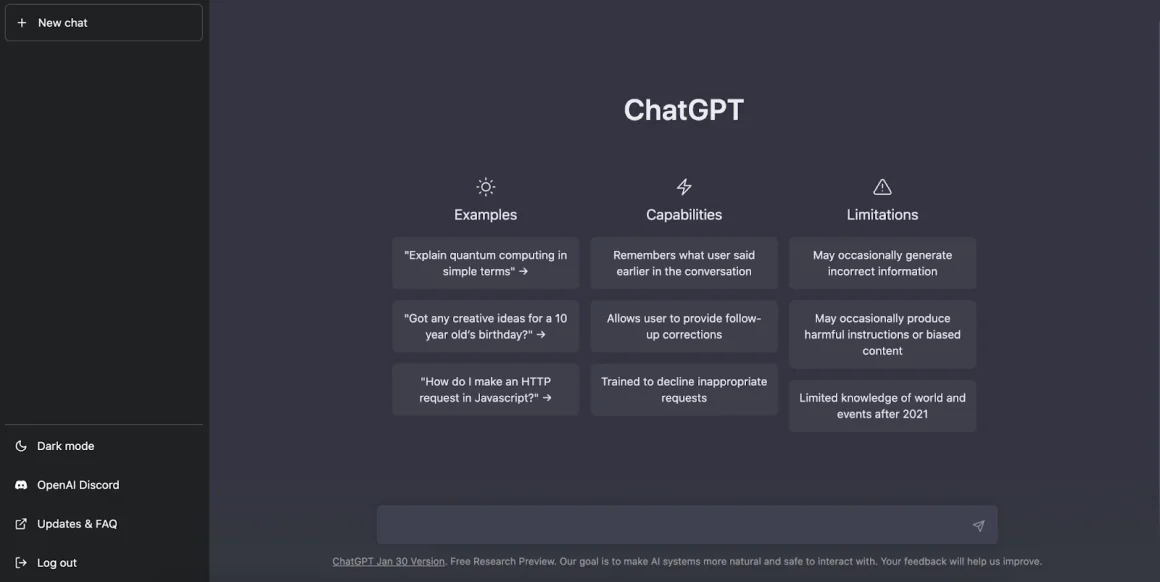
Finally, ChatGPT’s knowledge cutoff and limited access to real-time information means it can sometimes provide outdated answers, particularly in fast-moving industries like technology or healthcare. Paid versions with plugin access or manual updates help mitigate this risk.
Maintaining Empathy in Automated Support
One common complaint about chatbots is their impersonal nature, which can frustrate customers especially during sensitive interactions. To counter this, businesses should customize ChatGPT’s tone to be warm and professional. Starting conversations with friendly welcome messages and using sentiment analysis to adapt replies fosters a more human-like experience.
In practice, the AI can suggest empathetic responses or escalation for distressed customers, helping maintain brand reputation and customer loyalty. Training ChatGPT to recognize subtle cues and respond appropriately enhances the overall quality of service, even when automation is involved.


