Introduction to DIY Motion Sensor Alarms
Why Use Raspberry Pi for Security Projects?
The Raspberry Pi is an affordable and versatile microcomputer ideal for DIY security projects. Its compact size, extensive community support, and flexible GPIO pins make it suitable for building custom motion sensor alarms. With a Raspberry Pi, you can tailor security systems to your specific needs while gaining hands-on experience with hardware and programming.
Overview of Motion Sensor Alarm Systems
Motion sensor alarms detect movement in designated areas, triggering alerts or alarms when motion is sensed. These systems typically use a Passive Infrared (PIR) sensor to recognize infrared radiation emitted by humans or animals. When motion is detected, the alarm system activates connected indicators, such as LEDs, buzzers, or notifications, enhancing home or office security.
Essential Components and Tools
Hardware Required
Key hardware includes a Raspberry Pi with Ethernet connectivity and a compatible operating system. The HC-SR501 PIR sensor is commonly used to detect motion. Additional parts like red and green LEDs help indicate sensor status visually. An LTE modem, such as the Teltonika TRM240, combined with a SIM card, enables sending SMS alerts to notify users remotely.
Software and Libraries
The Raspberry Pi must have the latest Raspberry Pi OS installed, along with necessary software packages. Essential libraries for this project include python3 for scripting, python3-gpiozero for GPIO control, and python-serial for communication with the LTE modem. These tools allow easy integration between hardware components and enable programming custom alerts.
Additional Accessories and Setup Tools
Other useful items include jumper wires for connections, current-limiting resistors for LEDs, and a monitor or SSH client for Raspberry Pi setup. Proper mounting accessories for the LTE modem antenna are crucial to ensure strong signal reception. This setup facilitates efficient assembly and smooth operation of the motion sensor alarm.
Preparing the Raspberry Pi Environment
Installing the Operating System
Start by downloading the Raspberry Pi OS image from the official website. Use imaging software to flash the OS onto an SD card. Once inserted into the Raspberry Pi, the device will boot into the operating system, ready for configuration and package installation.
Configuring Necessary Settings
Initial configuration includes setting up time zones, network connections, and enabling SSH for remote access. Installing required packages such as python3, gpiozero, and serial libraries ensures the system can interact with connected components. Proper setup of user permissions is also necessary to allow script execution without errors.
Setting Up Remote Access
Enabling SSH enables remote management, making it easier to deploy and test the motion sensor alarm without a dedicated monitor or keyboard. Configuring a secure password and optionally using key-based authentication enhances system security during remote connections.
Connecting the Motion Sensor
Understanding PIR Sensor Pins
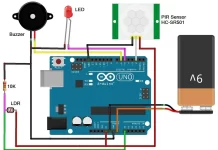
The HC-SR501 PIR sensor includes three main pins: VCC for power supply, GND for grounding, and OUT for the output signal indicating motion detection. Understanding these pins is essential for correct wiring and reliable sensor operation.
Wiring the Sensor to Raspberry Pi GPIO

Connect the PIR sensor’s VCC and GND to the Raspberry Pi’s 5V and ground pins, respectively. The OUT pin should be connected to GPIO pin 8 to receive the motion detection signal. Ensure connections are secure and avoid short circuits by using proper jumper wires and techniques.
Testing Sensor Connectivity
After wiring, perform basic connectivity tests by running a simple Python script that reads the sensor’s output. When motion is detected, the script should print or activate an indicator, confirming correct sensor functionality and GPIO configuration.
Writing the Motion Detection Code
Python Basics for GPIO Interfacing
Python’s gpiozero library simplifies interaction with Raspberry Pi GPIO pins. Importing necessary classes for input and output control allows efficient sensor monitoring. Basic understanding of Python syntax and event-driven programming is helpful for implementing motion detection.
Implementing Motion Sensing Logic
The main logic involves monitoring the PIR sensor’s output pin. When motion is detected, the script triggers predefined actions such as lighting up LEDs or sending alerts. Implementing debouncing or delay mechanisms helps prevent false triggers and repeated alerts during continuous movement.
Creating Alert Mechanisms
Incorporate communication with the LTE modem via serial connection to send SMS alerts. Use AT commands to configure the modem, disable echo, set text mode, and define the character set. When motion is detected, an SMS is sent to a predefined phone number, providing real-time notifications.
Adding Alarm Sound or Notifications
Integrating a Buzzer or Speaker
For audible alerts, connect a buzzer or small speaker to GPIO pins with a current-limiting resistor to prevent damage. The Python script can activate the buzzer upon motion detection, offering immediate physical confirmation of intrusions alongside visual or SMS alerts.
Sending Email or Push Notifications
Beyond SMS, the system can be enhanced to send email or push notifications using internet connectivity. Libraries such as smtplib for email or third-party services for push alerts expand the notification options, catering to user preferences for remote alerts.
Advanced Features and Customizations
Motion Sensitivity Adjustments
The PIR sensor includes potentiometers to adjust sensitivity and delay time. Sensitivity controls detection range, typically between 3 to 7 meters, while delay time defines the alert interval from 5 seconds up to 5 minutes. Fine-tuning these settings reduces false alarms and improves system reliability.
Automated Logging and Data Storage
Logging motion events with timestamps allows review and analysis of security incidents. The system can store this data locally on the Raspberry Pi or send it to remote servers or cloud services for backup. Automated logging facilitates pattern recognition and system auditing.
Building a Mobile App Interface
Developing a mobile app interface grants users real-time control and monitoring of the alarm system. The app can display sensor status, alert history, and offer remote configuration options. Integrating mobile-friendly features improves user experience and accessibility.
Testing and Troubleshooting
Common Problems and Fixes
Frequent issues include poor LTE modem signal due to unmounted antenna, incorrect wiring of the PIR sensor or LEDs, and missing software packages. Verifying connections, checking software installations, and identifying the correct modem communication port (e.g., /dev/ttyUSB2) solve most problems.
Optimizing System Performance
Use current-limiting resistors with LEDs to avoid damage. If the script fails due to insufficient privileges, run it with sudo. Adjust sensor delay and sensitivity to balance detection accuracy and false alarm minimization. Monitoring system logs helps identify and correct errors efficiently.
Conclusion and Further Learning Resources
Building a DIY motion sensor alarm with Raspberry Pi fosters practical skills in electronics, programming, and security system design. By following proper hardware connections and coding practices, users can create reliable and customizable alarms. For further learning, explore Raspberry Pi forums, Python programming tutorials, and IoT security projects to expand and enhance your system.