Understanding the Importance of Automation in Small Business Invoicing
Common Challenges in Manual Invoicing
Small businesses often face significant hurdles when managing invoicing manually. The process can become inefficient due to the sheer volume of repetitive tasks like data entry and verification. Manual processes tend to slow down accounts payable, creating bottlenecks that delay payments and disrupt cash flow. Invoices frequently come in varied formats, some with key information missing or obscured, compounding the difficulty of processing them accurately. Additionally, smaller suppliers may lack the resources to adapt to vendor portals, meaning many invoices must be handled individually, increasing the workload. This chaos often leads to human error—misplaced decimals, transposed numbers, or duplicate entries—that not only causes inaccurate payments but also undermines vendor relationships. Disorganized paper invoices add another layer of complexity, making tracking and reconciliation time-consuming and error-prone. Without clear, up-to-date spending reports, staying on top of financial obligations becomes a challenge, stretching already busy managers thin and increasing the risk of missed or late payments.
Benefits of Automating the Invoicing Process
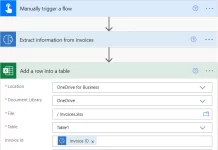
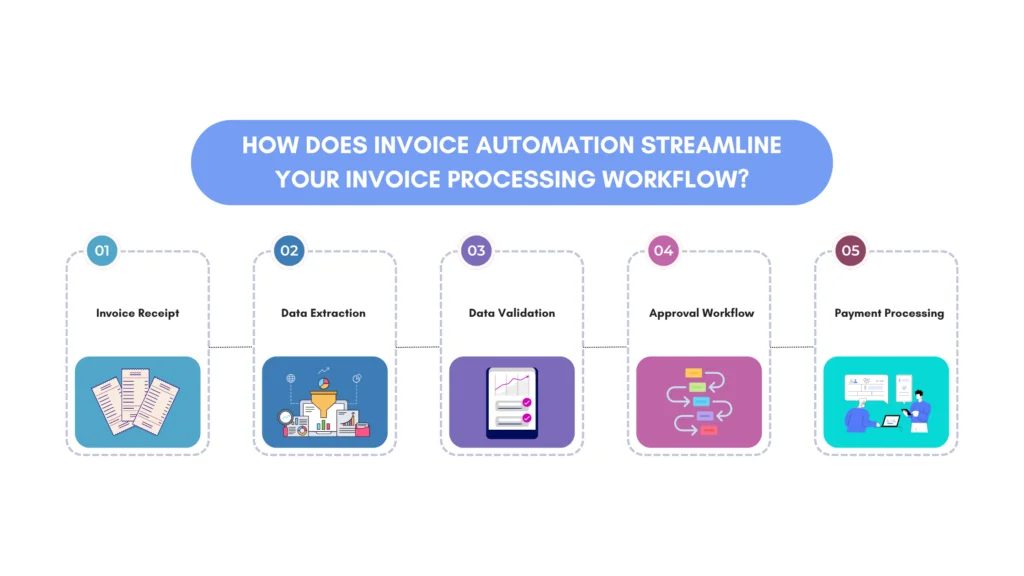
Automation transforms the invoicing process by addressing these common challenges head-on. Technologies such as Optical Character Recognition (OCR) allow invoices to be captured and processed quickly, reducing manual data entry and minimizing errors. Automated workflows enforce approval hierarchies and facilitate exception handling, routing discrepancies to the right people with complete context, which accelerates resolution. With automation, businesses gain real-time visibility into their expenses through comprehensive dashboards and reporting tools. This not only helps maintain cash flow but also empowers managers to make informed, data-driven decisions. Moreover, automation supports scheduled payments and notifications, virtually eliminating late fees and maintaining positive vendor relationships. With digital storage solutions, invoices are organized and easily retrievable, simplifying audits and disputes. Overall, automation frees up valuable time for managers to focus on strategic activities rather than repetitive administrative tasks.
Choosing the Right Invoicing Automation Software
Key Features to Look For
Selecting invoicing automation software requires a strategic approach to ensure it fits your business needs. Key features include robust OCR and Intelligent Character Recognition (ICR) capabilities for accurate invoice capture across diverse formats. The software should support automated two-way or three-way matching to verify invoices against purchase orders and receipts, helping identify discrepancies early. An intuitive workflow engine is crucial for routing approvals and exceptions efficiently while maintaining an audit trail for compliance. Integration with existing accounting, payroll, and inventory management systems enhances overall operational efficiency. Reporting capabilities that offer real-time dashboards and comprehensive financial data exports are vital for forecasting and budget management. Finally, the solution should be scalable, able to support multiple locations and business growth without sacrificing performance or usability.
Top Invoicing Tools for Small Businesses in 2024
In 2024, several invoicing automation solutions stand out for small businesses due to their balance of powerful features and user-friendly design. Tools like QuickBooks Online, FreshBooks, and Zoho Invoice provide cloud-based invoicing combined with automation for data capture and payment tracking. More specialized platforms, such as Tipalti and Stampli, focus on end-to-end accounts payable automation, offering advanced matching and exception handling. These platforms often include vendor onboarding support, critical for ensuring smaller suppliers can participate without disruption. When choosing among these options, consideration of your specific pain points and risk tolerance is essential, as overly complex systems may hinder adoption rather than help.
Integrations and Compatibility Considerations
Automation cannot work effectively in isolation. The chosen invoicing software must seamlessly integrate with your existing ERP, accounting, payroll, and treasury management systems. A lack of integration can create silos that negate efficiency gains by requiring manual reconciliation across platforms. Compatibility with multiple data formats and systems ensures that invoices from different vendors and departments flow smoothly through the process without manual intervention. Understanding the technical requirements and organizational change implications beforehand is critical to avoid surprises during implementation. Evaluating the vendor’s support for onboarding and ongoing training helps prevent a fragmented ecosystem where digital and manual processes coexist inefficiently.
Step-by-Step Guide to Setting Up Automated Invoicing
Preparing Your Client and Product Data
The foundation of any successful invoicing automation lies in clean, well-organized client and product data. Before implementation, businesses should audit and standardize their customer records, including contact details, payment terms, and billing preferences. Similarly, product or service listings should be consistently coded and detailed to ensure invoices accurately reflect sold items. This preparation minimizes exceptions during processing, drastically reducing manual intervention. Establishing clear guidelines for data entry and maintenance aligns the team and supports system accuracy as automation scales up.
Configuring Invoice Templates and Payment Terms
Once data is ready, the next step is configuring invoice templates within the automation software. Customizable templates ensure compliance with legal and branding requirements and preserve clarity for clients. Payment terms must be clearly defined and configured to align with your financial policies and cash flow objectives. This includes specifying due dates, early payment discounts, late fees, and accepted payment methods. Automation of these parameters guarantees consistency and reduces the risk of disputes or delays due to unclear billing conditions. This step also includes setting up automated reminders and notifications to proactively manage payments.
Scheduling and Automating Recurring Invoices
Many small businesses benefit from automating recurring invoices for subscription services or regular clients. Scheduling these invoices saves substantial time by eliminating repetitive tasks and ensuring timely billing without manual oversight. Automation can generate, send, and even follow up on these invoices, maintaining predictable cash flow. Setting rules for frequency, amounts, and adjustments within the software allows for flexibility if the client’s needs change. By automating recurring invoices, businesses avoid the errors and missed payments that often accompany manual handling.
Best Practices to Maximize Efficiency and Accuracy
Maintaining Updated Records and Client Information
Even with automation, maintaining accurate and current client and supplier data is essential. Outdated records lead to payment delays, miscommunication, and increased exceptions that require manual resolution. Regular audits and automated alerts for data inconsistencies help preserve data integrity. Empowering staff to update information promptly and establishing clear responsibilities contribute to smooth invoice processing and improved vendor satisfaction.
Automation and Compliance: Ensuring Legal Requirements
Compliance remains a non-negotiable aspect of invoicing, especially with evolving tax regulations and digital recordkeeping laws. Automation tools help enforce compliance by embedding tax calculations, generating audit trails, and securely storing digital invoices. Automated workflows also ensure that approvals follow mandated hierarchies and that document retention meets regulatory standards. Choosing a solution with built-in compliance features reduces risk and demonstrates professionalism to clients and auditors alike.
Monitoring and Analyzing Invoice Performance
Automation provides more than just operational efficiency—it delivers valuable insights through real-time monitoring of invoicing performance. Dashboards can highlight payment trends, outstanding balances, and bottlenecks in the approval process. Analyzing this data enables businesses to forecast cash flow, identify problematic vendors or clients, and optimize payment schedules. Regular review of these metrics allows proactive management and continuous improvement of the invoicing process, ultimately supporting better financial health.
Case Studies: Small Businesses Successfully Automating Invoicing
Industry-Specific Examples
Consider a small manufacturing firm that struggled with multiple ERP systems and diverse invoice formats from suppliers. By implementing an OCR-powered automation solution tailored to its industry, the company reduced manual entry errors and accelerated approval cycles. Another example is a service-based business that used automation to schedule recurring client invoices, freeing managers from repetitive billing tasks and allowing them to focus on client relations. Across industries, businesses that prioritize strategic adoption and vendor onboarding see the greatest benefits, regardless of sector.
Measurable Improvements Achieved
The results speak volumes. Many small businesses report a 50% reduction in invoice processing time and a 30% decrease in late payments after adopting automation. Errors caused by manual entry dropped substantially, improving accuracy and reducing disputes. With real-time dashboards, managers gained visibility into spending trends and could act proactively, improving cash flow management. Furthermore, automated alerts helped maintain strong vendor relationships by ensuring timely payments and quick resolution of discrepancies. These measurable outcomes prove that thoughtful automation transforms invoicing from a painful chore into a streamlined, strategic asset.