
Introduction to Budget-Friendly Smart Home Security
Why Choose a Smart Home Security System?
Setting up a smart home security system has become more accessible than ever. Beyond just deterring burglars, these intelligent systems offer peace of mind by keeping you connected to your home, no matter where you are. With real-time alerts and remote controls, you gain a level of awareness and convenience traditional setups simply can’t match. Plus, today’s technology adapts to your lifestyle, allowing seamless integration with other smart devices in your home.
Many people overlook home security until something unfortunate happens. But by opting for a smart system early, you not only protect your property but also create a safer environment for your loved ones. Smart home security can blend easily into your daily routine, making it less intrusive while enhancing your home’s defense.
Cost Considerations for Smart Security Solutions
One of the biggest concerns about adopting smart home security is the cost. Professional systems often come with hefty installation fees, ongoing monitoring charges, and sometimes long-term contracts that add up over time. These expenses can deter many from taking that vital step toward securing their homes.
Fortunately, many affordable and DIY options exist that allow you to tailor a system to suit your budget. By identifying the weak points in your home and selecting only the components you truly need, you can craft a smart security setup without breaking the bank. This approach eliminates unnecessary expenses and gives you full control over your system’s features and maintenance.
Essential Components for an Affordable Setup
Smart Cameras: Features and Price Points
Smart cameras are at the heart of any security system, offering visual surveillance day and night. When working with a budget, it’s important to focus on cameras with key features such as motion detection, night vision, and wireless connectivity. These functionalities ensure you receive timely notifications while maintaining clear visibility even in the dark.
Many cameras require cloud storage plans for recording video, which can add to recurring costs, so consider models that offer local storage or free basic cloud services. Additionally, keeping in mind privacy concerns, especially with indoor cameras, helps you avoid unintended vulnerabilities.
Smart Locks and Sensors: Choosing What Matters
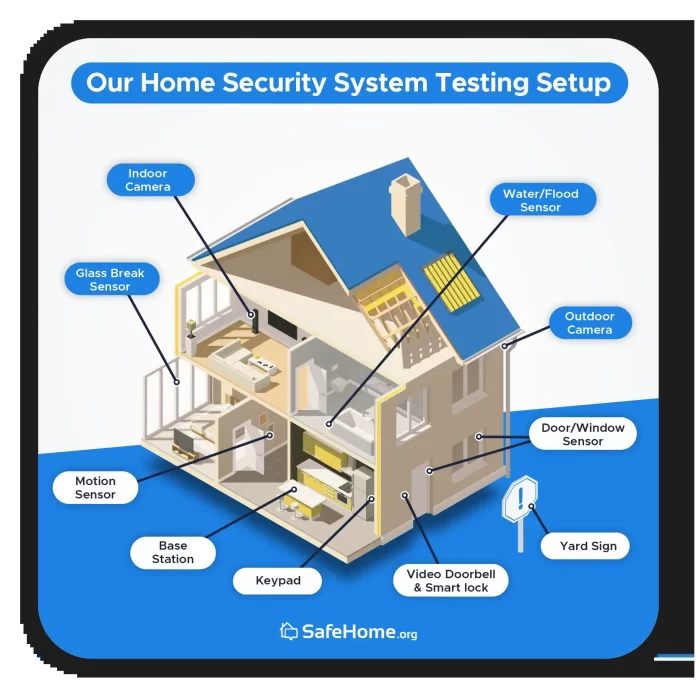
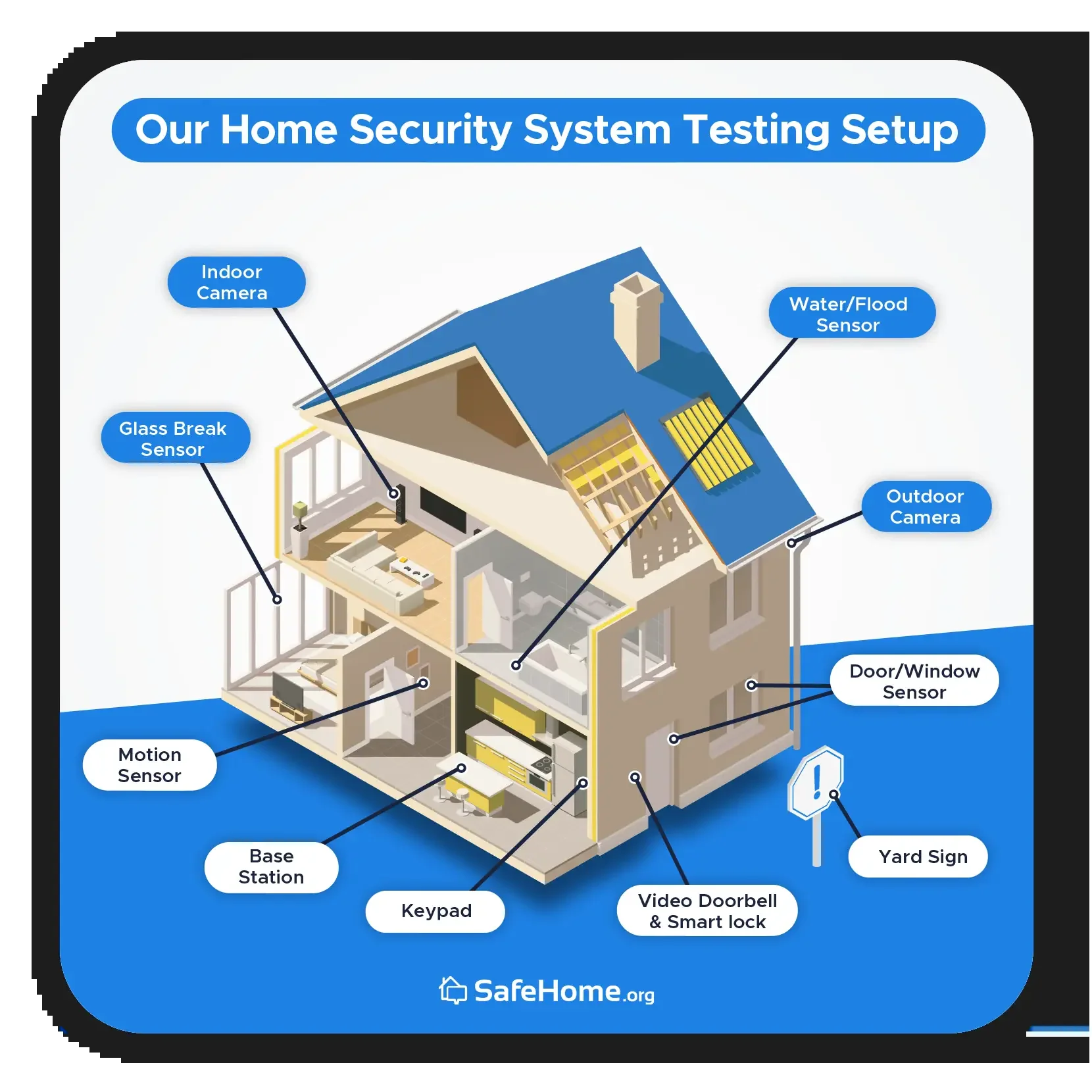
Locks and sensors serve as frontline defense tools. Smart locks bring convenience, allowing you to control access through your phone and even generate temporary entry codes for guests or service providers. Door and window sensors are essential for alerting you to unauthorized attempts at entry.
Motion sensors are especially useful in high-risk areas like garages, rear doors, and corridors. Combining these sensors with a loud DIY alarm can act as a strong deterrent. Since adhesive mounting can fail, especially with certain sensors, anchoring them with screws is a wise choice to ensure they stay securely in place.
DIY vs Professional Installation: Pros and Cons
Choosing between DIY and professional installation depends on your priorities and comfort level. DIY systems are generally more budget-friendly and offer the advantage of customization without hidden fees. They typically require minimal tools and can be set up within 30 minutes, particularly with brands like SimpliSafe, which provide detailed instructions and intuitive apps for pairing devices.
On the other hand, professional systems come with expert installation and constant monitoring services, which some homeowners find reassuring. However, these are often costly, come with long-term contracts, and may involve privacy trade-offs due to third-party monitoring. For many, starting with a DIY system and gradually expanding is a practical and economical choice.
Step-by-Step Guide to Installing Your System
Planning Your Home Security Layout
Before purchasing devices, take time to identify the vulnerable spots in your home. Entry points like front and back doors, ground-floor windows, and garages usually demand immediate attention. Mapping out these areas will help you decide where cameras, sensors, and motion detectors should be strategically placed.
Think about coverage that maximizes visibility while minimizing blind spots. For instance, installing cameras at your driveway and backyard can capture unexpected activity early. Early planning prevents unnecessary spending and ensures your system fits the unique layout of your home.
Installing Cameras and Sensors Correctly
Proper installation is key to system effectiveness. Outdoor cameras generally need to be charged overnight before mounting and should be connected to your Wi-Fi network using the companion app. Indoor devices require secure placement to avoid privacy pitfalls; be mindful of where they face, especially in sensitive areas.
Sensors, particularly those from SimpliSafe, often come with adhesive tapes, but relying solely on these can result in devices falling off over time. Anchoring with screws or other hardware is a sturdier solution. After installation, test every sensor by opening windows or doors to confirm they trigger alerts as expected.
Setting Up the Central Hub and Mobile Integration
The central hub is the brain of your smart home security system. Typically, this device connects all your cameras, sensors, and locks, sending data to your smartphone for remote monitoring. Most DIY systems streamline this step via user-friendly apps that guide you through pairing devices and configuring settings.
Once connected, customize alerts and automations to suit your needs. For example, receiving notifications only during specific hours or triggering external lights with motion detection can improve usability and reduce false alarms. Regular interaction with your system helps ensure its responsiveness and reliability.
Optimizing and Maintaining Your Smart Security
Regular Updates and System Checks
Technology evolves, and keeping your system updated is crucial to maintaining security. Manufacturers regularly release firmware updates that patch vulnerabilities and improve functionality. Setting your system to update automatically or checking for updates weekly can prevent security gaps.
It’s also wise to conduct periodic system tests. Open doors and windows equipped with sensors to verify they register correctly. Check camera feeds and alerts to ensure smooth operation. This proactive approach catches issues before they turn into serious problems.
How to Expand Your System Over Time
One of the perks of DIY smart security is scalability. You don’t have to invest in a complete setup at once. Start with a video doorbell and a few motion sensors, then add smart locks or outdoor cameras as your budget allows. This gradual expansion lets you adapt the system to changing needs and new vulnerabilities.
Use your smartphone app to seamlessly integrate additional devices, maintaining centralized control. Consider enhancing your setup with budget-friendly hacks such as motion-activated lighting, window security film, or signs warning potential intruders. These measures add layers of deterrence without significant cost.
Real-Life Examples of Cost-Effective Smart Security Systems
Case Study 1: Small Apartment Setup
Jane, a city dweller, wanted to secure her small apartment without breaking her budget. She began with a simple video doorbell and two motion sensors by the entrance and hallway. Using a DIY system with no professional monitoring, she could monitor visitors and receive motion alerts through her phone.
Quick installation and easy integration with her smartphone app gave her peace of mind. Jane plans to add smart locks soon and keep testing sensors regularly. This setup allowed her to prioritize security affordably without sacrificing her privacy.
Case Study 2: Family Home on a Budget
The Thompsons live in a mid-sized family home and chose a layered approach for protection. They installed outdoor cameras covering the driveway, backyard, and both front and rear doors. Indoor motion sensors were placed near common entry points, and smart locks were added on main doors.
They anchored sensors with screws to avoid tape failures and avoided costly professional monitoring, opting instead for DIY alerts on their phones. The family enhanced security with motion-activated lights and “Beware of Dog” signs, creating a comprehensive yet budget-conscious system tailored to their home’s unique vulnerabilities.


