Understanding API Authentication in Vue Vite Projects
What is API Authentication?
When building applications, especially those that communicate with back-end services, verifying the identity of users and ensuring secure access has become a fundamental task. API authentication is the process where a client proves its identity to an API, granting or denying access to protected resources. In Vue Vite projects, this means making sure that users interacting with your frontend are properly authenticated before accessing sensitive data or functionality.
This process typically involves sending credentials or tokens with API requests, allowing the server to verify who is making the request. Without proper authentication, APIs would be open to unauthorized users, which can lead to data breaches or misuse of services.
Key Authentication Methods Relevant to Vue Vite
In the context of Vue Vite applications, several authentication methods stand out. Traditional username and password combinations still exist, but they’re often paired with token-based mechanisms to improve security and scalability. Two popular approaches are JSON Web Tokens (JWT) and OAuth 2.0.
JWT is a compact, URL-safe token format commonly used in SPA (Single Page Applications). It encodes user information and expiry details, allowing for stateless authentication. OAuth 2.0, meanwhile, is a delegation protocol which permits app users to authorize third-party platforms without exposing credentials. Many modern Vue projects integrate OAuth flows through providers such as Auth0, Google, or Facebook for social logins.
Choosing the right method often depends on your project needs and the APIs you interact with. Usually, combining these methods with secure token storage and refresh mechanisms ensures a smooth user experience.
Importance of Secure Authentication in Frontend Applications
Authentication is more than just gating access; it’s about protecting user data and maintaining trust. Frontend applications, like those built with Vue and Vite, run in the browser, which can expose vulnerabilities if authentication isn’t handled carefully. Poor token handling, such as storing tokens insecurely or failing to refresh expired tokens, can lead to security lapses like token theft or unauthorized sessions.
Security breaches not only affect your users but can damage your application’s reputation. By implementing robust authentication practices, you ensure that only authorized users can access sensitive APIs and that sessions are managed properly. This foundation is vital for building scalable and trustworthy applications.
Implementing Token-Based Authentication
Choosing the Right Token Strategy: JWT vs OAuth
Deciding between JWT and OAuth strategies depends largely on your authentication goals. JWT offers simplicity with stateless tokens, enabling your Vue app to carry authentication credentials without needing server-side session storage. This approach is fast and easy to implement but requires careful token management to avoid security issues.
OAuth, on the other hand, is more suited to applications that require delegated access—where users authenticate via a third-party provider. This method often involves exchanging authorization codes and tokens, adding a layer of complexity but improving security for large-scale or enterprise-grade apps.
In practice, many Vue Vite projects rely on OAuth providers like Auth0, combining OAuth flows with JWT tokens issued by the provider. This hybrid approach leverages the strengths of both methods.
Storing Tokens Securely in Vue Applications
Where you store your tokens in a frontend app is crucial. While localStorage and sessionStorage are common places, they can be vulnerable to cross-site scripting (XSS) attacks. A safer approach can involve storing tokens in HTTP-only cookies, but this typically requires backend support.
In Vue applications, the Composition API can be used to manage authentication state elegantly. You might keep tokens in reactive variables or within Vuex stores, but always ensure sensitive tokens are not exposed unintentionally. When using Vite, prefix environment variables with VITE_ to safely manage API URLs or secret keys in a way that doesn’t leak them in the build.
Handling Token Expiry and User Sessions
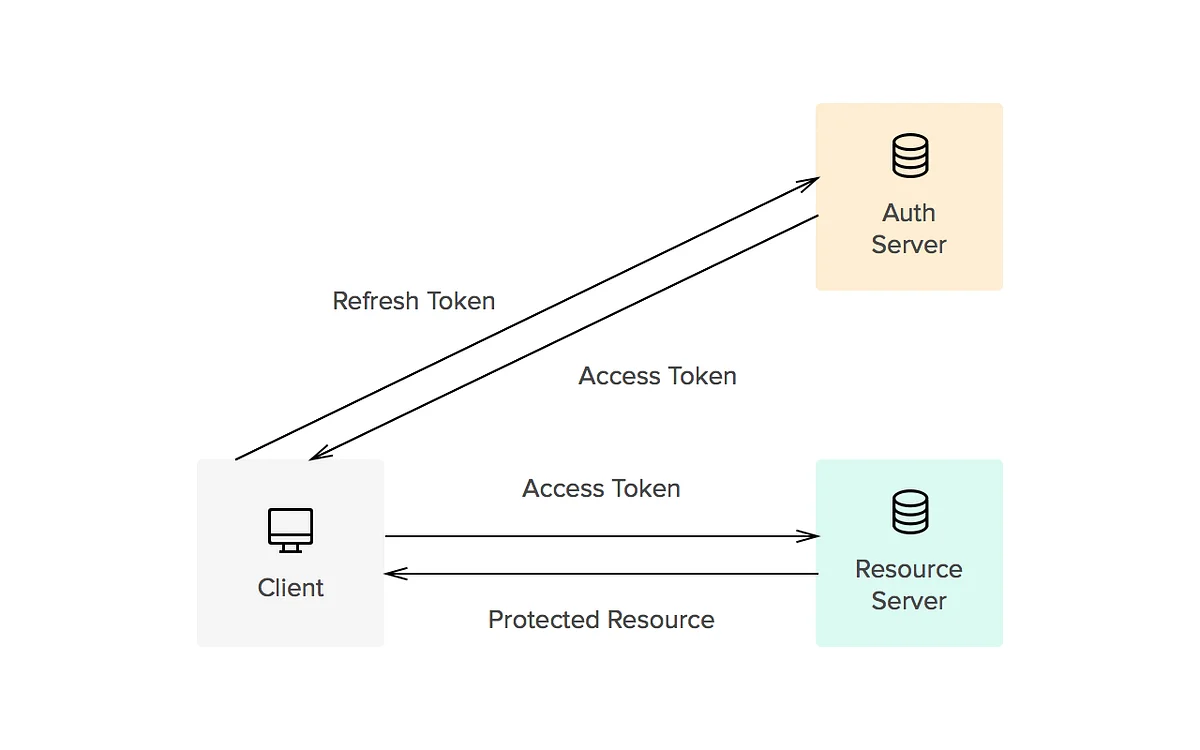
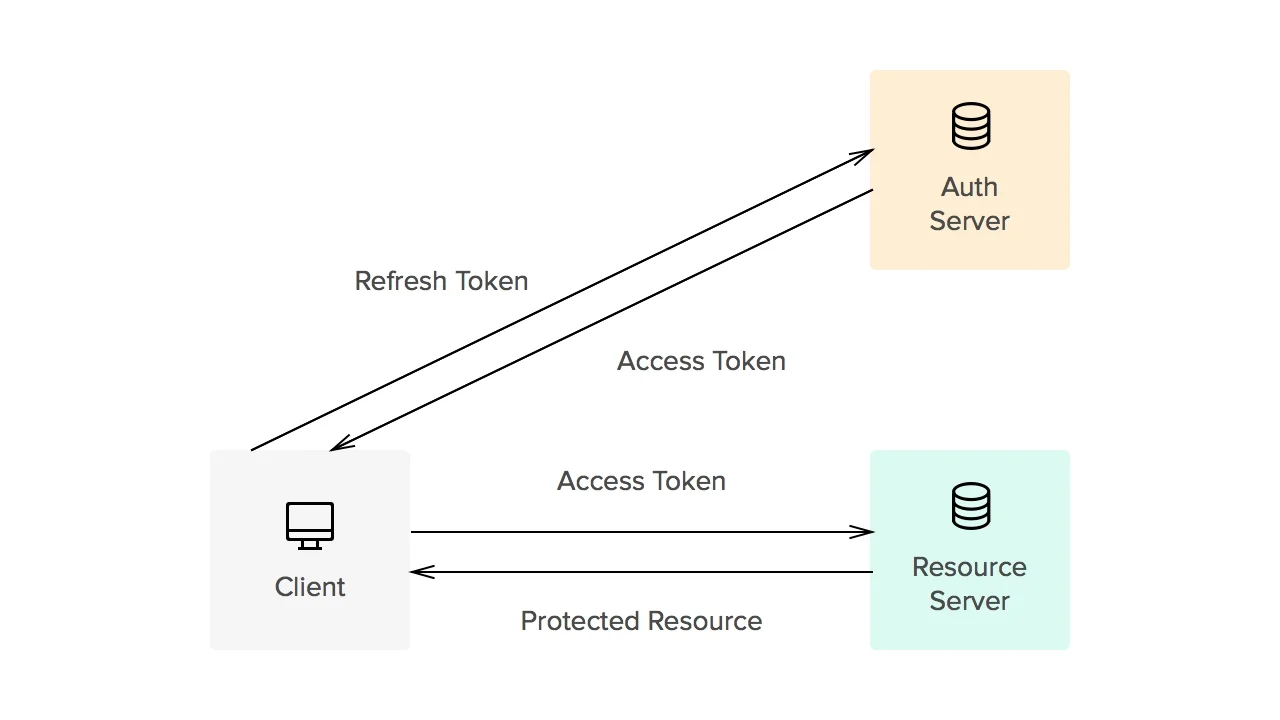
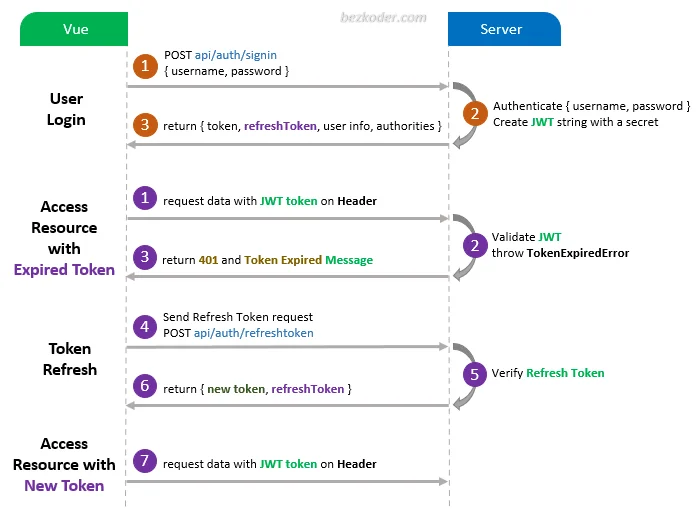
Tokens are typically short-lived for security reasons, which means your app must be ready to handle expiration gracefully. If a token expires during a user session, your app should detect this and attempt refreshing the token or redirecting the user to re-authenticate.
This process involves triggering refresh tokens or new login flows in the background, ensuring the user experience doesn’t suffer unnecessary interruptions. Proper token lifecycle management maintains session continuity while upholding security.
Step-by-Step Guide: Setting Up Authentication with Vue and Vite
Initial Project Setup and Dependencies
Starting off, you can clone a starter project like spa_vue_javascript_hello-world_composition-api. This template helps you learn Vue.js security concepts without building everything from scratch. Once cloned, install the necessary dependencies with npm install to prepare your environment.
For local API simulation during development, you can use json-server to run a mock backend. Create a .env file and add your API server URL using the VITE_API_SERVER_URL prefix, for example, http://localhost:6060. This allows your Vue app to connect seamlessly to your API.
Creating Authentication Service Layer
The next step involves building a dedicated service to handle authentication logic. Using the Composition API, you can create composable functions or services that encapsulate login, logout, token storage, and refresh functionalities. This modular approach keeps your code organized and reusable.
By interfacing with Auth0’s Vue SDK, you can implement authentication flows without coding login forms from scratch. Leveraging existing SDKs simplifies the process and enhances security.
Integrating Login and Logout Functionality
Once your service layer is ready, add login and logout buttons and associated handlers in your Vue components. Use route guards to protect certain pages, ensuring only authenticated users can access them. The Auth0 Universal Login provides a streamlined user interface for sign-in, sign-up, and logout, managing redirects securely.
Make sure to configure allowed redirect URLs in your Auth0 application settings, such as http://localhost:4040/callback, to avoid redirect errors after login. This setup is critical for enabling OAuth flows within your Vue Vite project.
Automating Token Refresh
Why Token Refresh is Critical
Token refresh ensures that users stay authenticated without frequent interruptions. Short-lived tokens improve security but require your app to automatically obtain new tokens when the old ones expire. Without token refresh, users may face unexpected logouts or be forced to re-enter credentials repeatedly.
For SPA frameworks like Vue, automating token refresh behind the scenes greatly improves usability and retention.
Setting Up Axios Interceptors for Token Renewal
Axios is a popular HTTP client used in Vue projects. By setting up Axios interceptors, you can intercept outgoing requests to attach valid tokens and intercept responses to detect token expiry errors. When such an error happens, your interceptor can trigger a token refresh process before retrying the failed request.
This approach centralizes token management, reducing boilerplate code and making it easier to maintain token-related logic.
Managing Refresh Tokens in Vue State
Refresh tokens are sensitive credentials that allow obtaining new access tokens without re-authenticating the user. In Vue, managing these tokens in application state—using reactive stores or Vuex—is common. However, treat refresh tokens with extra care to avoid security leaks.
Some implementations prefer to store refresh tokens in HTTP-only cookies, reducing exposure to XSS attacks. Whichever method you choose, ensure that tokens are updated promptly and invalidated during logout or suspicious activity.
Debugging and Best Practices
Common Issues in API Authentication and How to Fix Them
Developers often encounter various issues like tokens not being attached to requests, improper redirect URLs, or failed token refresh cycles. These usually stem from misconfigured environment variables, improper Auth0 application settings, or missing route guards.
Ensure your .env variables have the VITE_ prefix and match exactly with your API endpoints. Double-check that allowed callback URLs in your authentication provider settings include your local development addresses. Adding meaningful error handling in your authentication service also helps diagnose session and token issues early.
Security Best Practices for Token Handling
Never store tokens in plain text storage accessible by JavaScript if it can be avoided. Always prefer HTTP-only, secure cookies when your backend supports it. Use short-lived access tokens combined with refresh tokens to minimize risk exposure.
Regularly audit your application for XSS vulnerabilities since these can be an entry point for token theft. Use Vue’s built-in security features and keep dependencies updated. Additionally, use the starter project approach to focus on authentication security concepts without distraction.
Performance Considerations When Refreshing Tokens
While token refresh improves user experience, excessive or mismanaged refreshes can impact performance and server load. Avoid refreshing tokens on every request. Instead, refresh only on expiry or when a request returns an authentication error.
Employ debouncing or locking mechanisms so that multiple simultaneous failed requests don’t trigger parallel refreshes, which can cause race conditions or unnecessary API calls.
Conclusion and Further Reading
Handling API authentication and token refresh in Vue Vite projects is a critical yet manageable task. By understanding authentication fundamentals, carefully choosing token strategies, and leveraging tools like Auth0 and Axios interceptors, you can create secure and user-friendly Vue applications.
Start with a solid project template, use environment variables securely, and build modular authentication services. Always prioritize security best practices while keeping the user experience smooth through automatic token refresh. For further learning, explore the official Vue documentation on the Composition API, Auth0’s Vue SDK guides, and OAuth 2.0 fundamentals to deepen your understanding.