Understanding Time to First Byte (TTFB) in WordPress
What is TTFB and Why It Matters
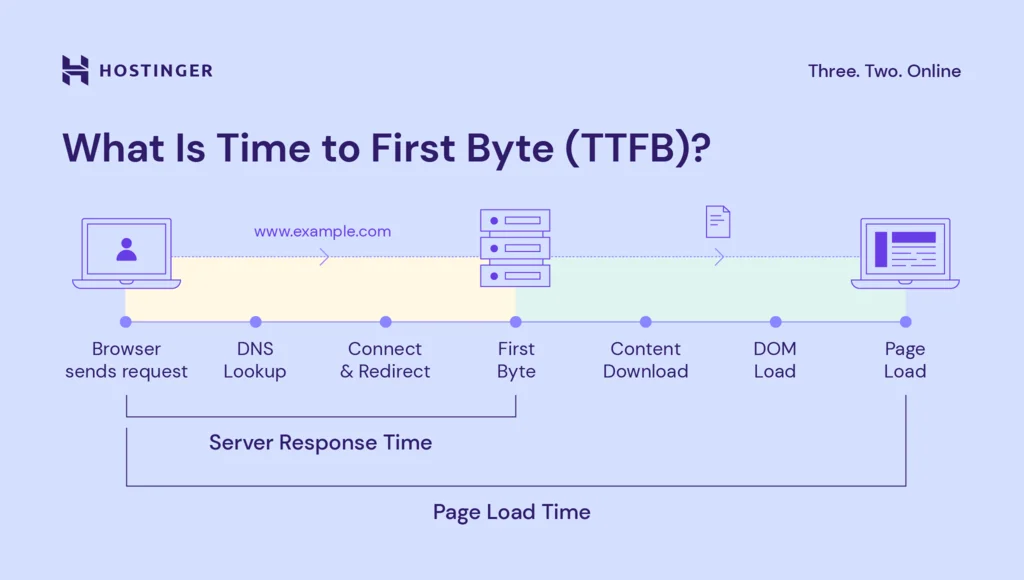
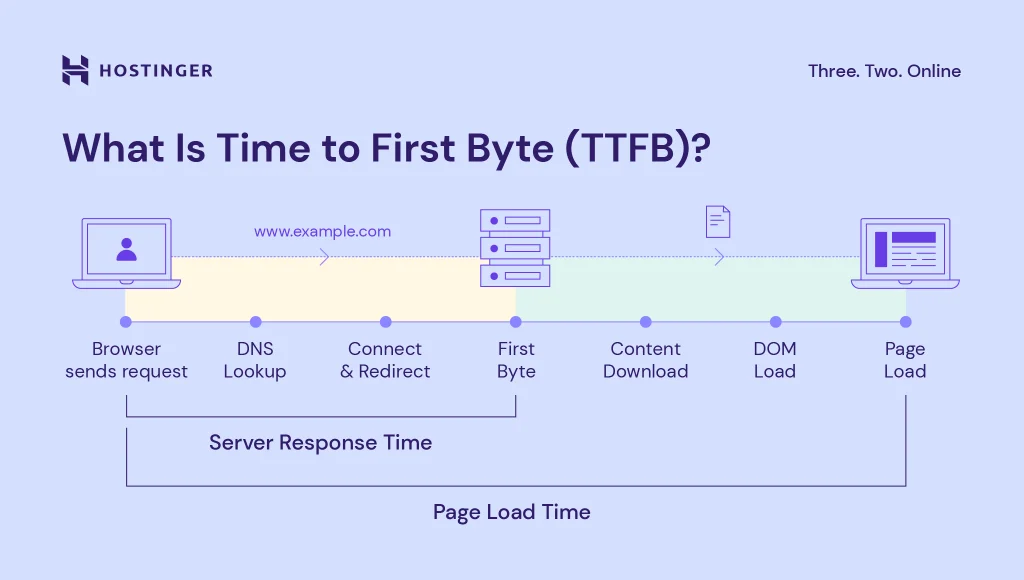
Time to First Byte, or TTFB, is a critical performance metric that measures the time it takes for a user’s browser to receive the first byte of data from the server after making an HTTP request. In simpler terms, it’s the initial delay between clicking a link and starting to see content load. For WordPress websites, TTFB is especially important because it reflects the server’s responsiveness as well as the efficiency of your WordPress setup.
TTFB is often a strong indicator of your site’s speed and user experience. A slow TTFB can frustrate visitors, increase bounce rates, and even affect your search engine rankings. Since WordPress relies on PHP execution and database queries, any inefficiency in these processes directly impacts TTFB.
Common Causes of High TTFB on WordPress Sites
Several factors can contribute to an inflated TTFB. A common culprit is plugins or functions within the website that take too long to process server-side. Sometimes, the active theme may have inefficient functions that cause delays as the server builds pages. Additionally, running outdated plugins or themes can introduce performance bottlenecks and security issues, both of which negatively influence TTFB.
Identifying these causes is the first step to improving the speed of your WordPress site. Troubleshooting often involves isolating themes and plugins to pinpoint what’s dragging down server responsiveness.
Server and Hosting Optimization for Better TTFB
Choosing the Right Hosting Provider
The foundation of a fast TTFB starts with your hosting provider. Not all hosts are created equal, and some offer better server performance, optimized WordPress environments, and faster network connectivity. Shared hosting may be cheaper but often results in slow server response times due to resource contention. Opting for managed WordPress hosting or cloud services with dedicated resources can significantly reduce initial server delays.
Investing in a quality host positions your site to benefit from quicker data handling, better uptime, and faster response for your visitors.
Configuring Server Settings and PHP Versions
After selecting a good host, optimizing server configurations can have a meaningful impact on TTFB. Ensuring your server runs the latest supported PHP version is essential since newer PHP versions come with performance improvements. For example, PHP 8 offers significant speed gains over older versions.
Web server settings, such as enabling OPCache and fine-tuning worker processes, can also enhance the speed at which your server processes WordPress requests. Proper configuration minimizes delays in server-side processing and helps deliver the first byte faster.
Leveraging HTTP/2 and SSL for Faster Response
Modern web protocols like HTTP/2 offer multiplexing and header compression, which reduce latency and speed up the communication between browsers and servers. Switching from HTTP/1.1 to HTTP/2, often made possible by your hosting provider, improves the overall loading efficiency.
While SSL might seem like it adds overhead, enabling HTTPS is essential and often required with HTTP/2. The benefits of SSL combined with HTTP/2 outweigh the minor processing cost, improving security and performance simultaneously.
Optimizing WordPress Core and Database
Updating WordPress and Plugins Regularly
Keeping WordPress, themes, and plugins up to date is critical for performance. Developers routinely release updates that not only patch security holes but also optimize code to run more efficiently. Outdated plugins or themes can introduce slow database queries or compatibility issues that increase TTFB.
Consistent updates ensure your site leverages the latest improvements and minimizes unexpected delays from legacy code.
Database Optimization Techniques
The WordPress database grows over time, accumulating post revisions, transient options, and other overhead that can slow down queries. Regular database optimization helps streamline data access and reduces server load during page generation.
Techniques such as cleaning up unused data, optimizing database tables, and indexing key columns improve database responsiveness. This reduces the time WordPress spends fetching content, thereby lowering TTFB. Using tools like WP-Optimize or manual SQL commands can assist in maintaining a lean database.
Reducing Server Requests with Caching Plugins
Caching plugins are invaluable for cutting down server workload and, consequently, TTFB. By storing static versions of pages or query results, caching prevents WordPress from executing heavy PHP and database queries on every request.
Popular caching plugins like W3 Total Cache, WP Super Cache, or Batcache can serve cached content instantly. This drastically cuts server response time and improves the initial byte delivery. Properly configuring cache retention and invalidation ensures your content remains fresh without sacrificing speed.
Advanced Techniques to Slash TTFB
Implementing Object Caching and CDN Integration
Going beyond page caching, object caching stores database query results in memory, allowing repeated queries to return data faster. Solutions like Redis or Memcached are often integrated at the server level to handle this efficiently. Object caching is especially useful for complex WordPress sites with dynamic content.
In addition, integrating a Content Delivery Network (CDN) distributes your site’s static assets across global servers, reducing latency for users far from your origin server. While CDNs primarily speed up asset delivery, they can also improve TTFB by offloading certain requests and reducing load on your main server.
Lazy Loading and Minimizing External Requests
Lazy loading delays loading images and other media until they are about to enter the viewport. This reduces the initial server processing and bandwidth, indirectly benefiting TTFB by allowing critical page elements to load faster.
Moreover, minimizing external requests for fonts, scripts, or third-party services helps reduce the number of roundtrips your server has to manage. Each external call adds latency, so optimizing or deferring these can contribute to a better first byte time.
Measuring and Monitoring TTFB for Continuous Improvement
Tools to Test and Track TTFB
Consistent monitoring is key to maintaining a healthy TTFB. Tools like WebPageTest.org provide detailed insights into how your site performs, including TTFB measurements across different locations and devices. For quick testing, Chrome’s Network tab in the developer console allows you to inspect TTFB directly during site load.
For command-line enthusiasts, using curl on Mac or Linux machines can quickly check TTFB without loading the full page. Adding a random query parameter to your URL can help bypass caching solutions like Batcache, giving a clearer picture of your server’s raw response time.
Interpreting Results and Setting Benchmarks
Understanding the numbers behind TTFB helps prioritize optimization efforts. Generally, a TTFB under 200 milliseconds is considered good for WordPress sites. When you see values creeping above 500 milliseconds, it’s time to dig deeper.
Regular testing, especially after updates or configuration changes, lets you track progress and catch regressions early. Establishing benchmarks based on your site’s average TTFB allows you to evaluate the effectiveness of optimization strategies and maintain a smooth user experience.