
Introduction to SaaS Project Management for Remote Teams
Why SaaS Tools Are Essential in 2024
In today’s dynamic work landscape, remote teams have become the norm rather than the exception. Managing projects across different time zones and locations presents unique challenges that traditional tools simply can’t handle efficiently. This is where SaaS project management tools step in. Unlike conventional software, SaaS solutions are cloud-based, offering real-time collaboration, seamless updates, and easy access from anywhere.
In 2024, as remote work continues to grow, these tools have evolved into indispensable allies for organizations striving to maintain productivity and clear communication. They help reduce missed communications, prevent crossed wires, and keep everyone aligned on deadlines despite the physical distance. Without them, teams risk lost documents, scope creep, and poor accountability, which can all derail projects.
Key Features to Look for in Remote Team Tools
Choosing the right SaaS project management tool involves more than picking the one with the flashiest interface. Remote teams particularly benefit from features that encourage clarity, accountability, and smooth workflows. Look for platforms offering integrated communication channels and real-time collaboration, as these reduce the need to toggle between multiple apps.
Automation capabilities are also crucial to minimize manual updates that often lead to missed deadlines. Tools that provide robust file storage and seamless integration with your existing SaaS ecosystem help tackle complexity and improve document management. Scalability is another must-have; your tool should grow with your team without compromising performance or usability.
Top SaaS Project Management Tools Overview
Criteria for Selection
In evaluating the best SaaS project management tools for remote teams in 2024, several criteria come into play. Usability is key – the tool must be intuitive enough for quick adoption, avoiding the steep learning curves seen with some complex platforms like Jira. Integration potential is also critical; your software should work smoothly with Slack, Google Workspace, Salesforce, or any other essential apps your team relies on.
Cost efficiency can’t be overlooked, especially for growing businesses. A scalable pricing model that aligns with team size and project demands ensures you’re not overspending. Lastly, strong collaboration features, including multiple project views, task automation, and accountability tracking, make for a platform that truly supports remote workflows.
Comparative Feature Matrix
While a detailed matrix can get overwhelming, it’s worth understanding how leading tools stack up against each other. Some prioritize customization and advanced workflows, perfect for tech-savvy teams managing complex projects. Others focus on ease of use and clean interfaces, appealing to small teams or those new to project management software.
Look for tools that balance power with simplicity, such as Asana or Monday.com, which offer automation without overwhelming users. Platforms like ClickUp provide scalability and feature rich environments for growing teams. Budget-conscious teams might lean towards Trello or Basecamp, which offer core project management features with minimal expense.
In-Depth Reviews of Leading Tools
Tool A: Strengths and Weaknesses
Asana shines as a versatile tool that caters well to diverse team structures and project types. Its strength lies in a powerful Rules engine that automates repetitive tasks, saving time and reducing human error. The interface is clean and approachable, enabling quick onboarding and steady user adoption.
However, Asana can sometimes fall short in handling very complex projects that require deep customization or sophisticated reporting. Teams with intricate needs might find the lack of advanced features limiting, and the cost can grow with larger user numbers.
Tool B: Best for Collaboration
Monday.com stands out for its exceptional collaboration capabilities. The platform supports customizable boards and offers multiple project views, making it ideal for creative teams and visual thinkers. Real-time updates and integrated communication channels help keep remote colleagues on the same page, while workflow automations streamline project progress.
The main consideration with Monday.com is ensuring that it scales effectively with your team’s growth, as costs may increase and complexity might require dedicated admins to manage workflows efficiently.
Tool C: Budget-Friendly Option
Trello remains a strong contender for small teams or startups looking for an accessible, no-frills project management solution. With a card-based, kanban-style interface, Trello keeps things simple and visual. Its free tier offers generous features, and the minimal learning curve lowers barriers for team adoption.
That said, Trello’s simplicity becomes a drawback for complex projects needing in-depth reporting, automation, or advanced integrations. For growing teams, the platform may require additional tools to fill in gaps, which can gradually increase costs and complexity.
Tool D: Advanced Customization
ClickUp is perfect for teams that need a powerful and highly customizable project management platform. It offers a wide array of features—multiple project views, robust automation, and a built-in document management system. This tool suits organizations facing increasing project complexity and needing strict accountability and visibility.
The trade-off is its learning curve, which some users find steep compared to simpler alternatives. Proper onboarding and training are essential to unlock ClickUp’s full potential without overwhelming the team.
Integrations That Enhance Remote Project Management
Popular Integrations Across SaaS Tools
The best project management tools don’t operate in isolation. They’re most effective when integrated with other business-critical applications. Common integrations include communication platforms like Slack or Microsoft Teams, document management with Google Workspace or Dropbox, and CRM systems such as Salesforce.
These integrations help eliminate manual switching between apps, prevent data silos, and enable smoother workflow transitions. Having a single source of truth for project updates and documents ensures everyone stays informed without losing time hunting for information.
How to Choose Tools with the Right Integrations
Selecting project management software with the right integrations involves understanding your existing tech stack and pain points. Begin by mapping the tools your team already uses daily and identify gaps where integration could boost productivity. Ensure the new platform supports these integrations natively or via popular middleware solutions.
Also, consider future growth and whether the software can connect with additional tools as your needs evolve. Avoid platforms that lock you into isolated ecosystems, as this can create inefficiency and frustration over time.
Case Studies: Remote Teams Succeeding with SaaS PM Tools
Startup Success Story
A growing startup recently transitioned to a SaaS project management tool to tackle coordination challenges across its remote workforce. By adopting Monday.com, the team overcame issues with scattered communications and missed deadlines. The visual boards made it easy for team members to track progress, and automation reduced manual update burdens, allowing them to focus on innovation rather than admin tasks.
This new system also enabled seamless integration with Slack and Google Drive, consolidating workflows and improving transparency. As a result, project completion rates increased while stress levels dropped, fueling faster product releases and happier clients.
Enterprise-Level Implementation
At the enterprise level, a multinational organization faced complexity due to multiple departments and intricate client requirements. They chose ClickUp for its advanced customization features and scalable licensing model. The platform’s comprehensive automation and time-tracking capabilities ensured better accountability across larger teams.
The integration with Salesforce and Microsoft Teams helped bridge gaps between sales, support, and project delivery functions. Over time, better visibility into project status and resource allocation led to more accurate forecasting and reduced scope creep, enhancing overall client satisfaction.
Tips for Maximizing Your SaaS Project Management Experience
Best Practices for Remote Teams
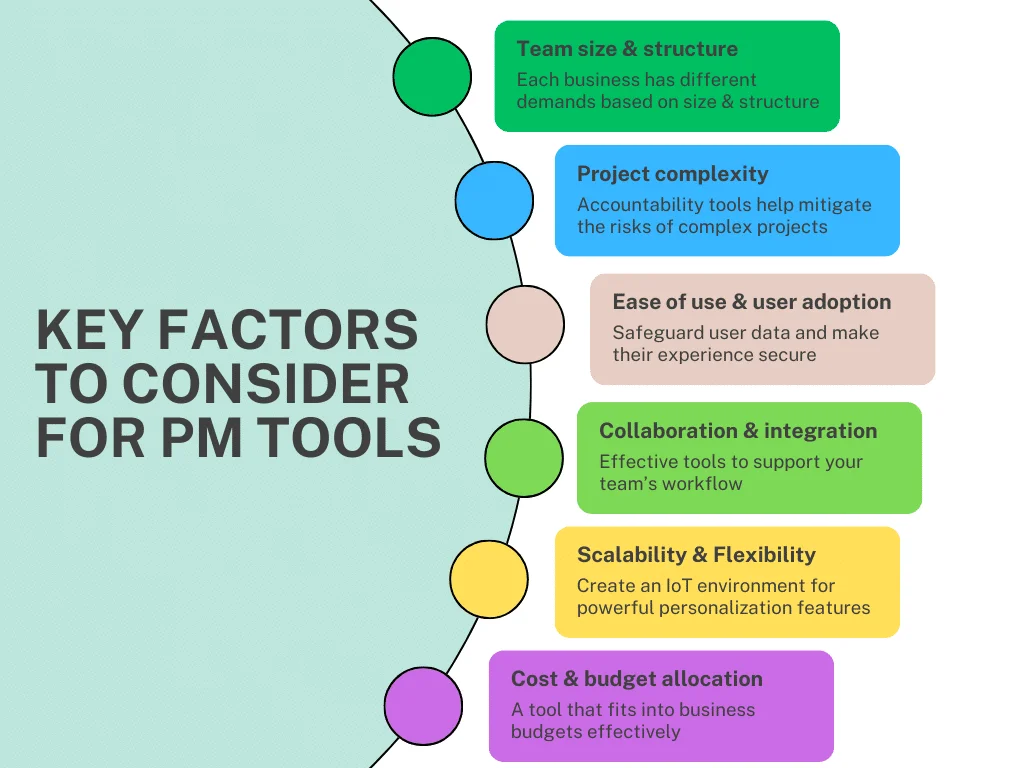
Success with a SaaS project management tool starts by reviewing past project performances and identifying pain points. Understanding your team size, project complexity, and specific business needs guides you toward features that will truly add value. Choose tools that offer long-term customer support and scalability to avoid frequent platform changes.
Don’t overlook the importance of user adoption. A highly sophisticated tool is only as good as the team’s comfort and proficiency with it. Engaging team members in selection and training increases the chance of consistent usage and measurable results.
Training and Onboarding Considerations

Effective onboarding can make or break the adoption of new SaaS tools. Provide hands-on training sessions, focusing on the features your team will use most. Highlight the automation options that reduce manual tracking and empower users to customize their workflows within the tool’s framework.
Leverage free plans or trial periods to allow teams to explore the software before fully committing. Collect feedback regularly to address challenges early, and consider appointing internal champions who can assist peers and maintain momentum.
Conclusion: Choosing the Right SaaS Project Management Tool
Finding the best SaaS project management tool for your remote team in 2024 requires balancing usability, integration, scalability, and cost. Avoid the common pitfalls of choosing overly complex or isolated platforms that hinder adoption and productivity. Instead, focus on solutions that streamline communication, automate routine tasks, and grow with your team’s evolving needs.
Whether you lean toward straightforward tools like Trello or powerful platforms like ClickUp, the key is to align your choice with your team’s unique workflows and collaboration style. With the right tool in place, remote teams can overcome distance barriers, deliver excellent results, and thrive in the digital-first era.


