
Introduction to DIY Arduino Home Security Systems
Why Choose Arduino for Home Security?
Arduino offers an affordable, flexible platform for building home security alarms. Its open-source environment allows easy customization, adapting to specific security needs. Unlike traditional systems, Arduino-based alarms enable hands-on learning and integration of various sensors, making it an ideal choice for DIY enthusiasts and tech-savvy homeowners.
Overview of Motion Sensors in Security Applications
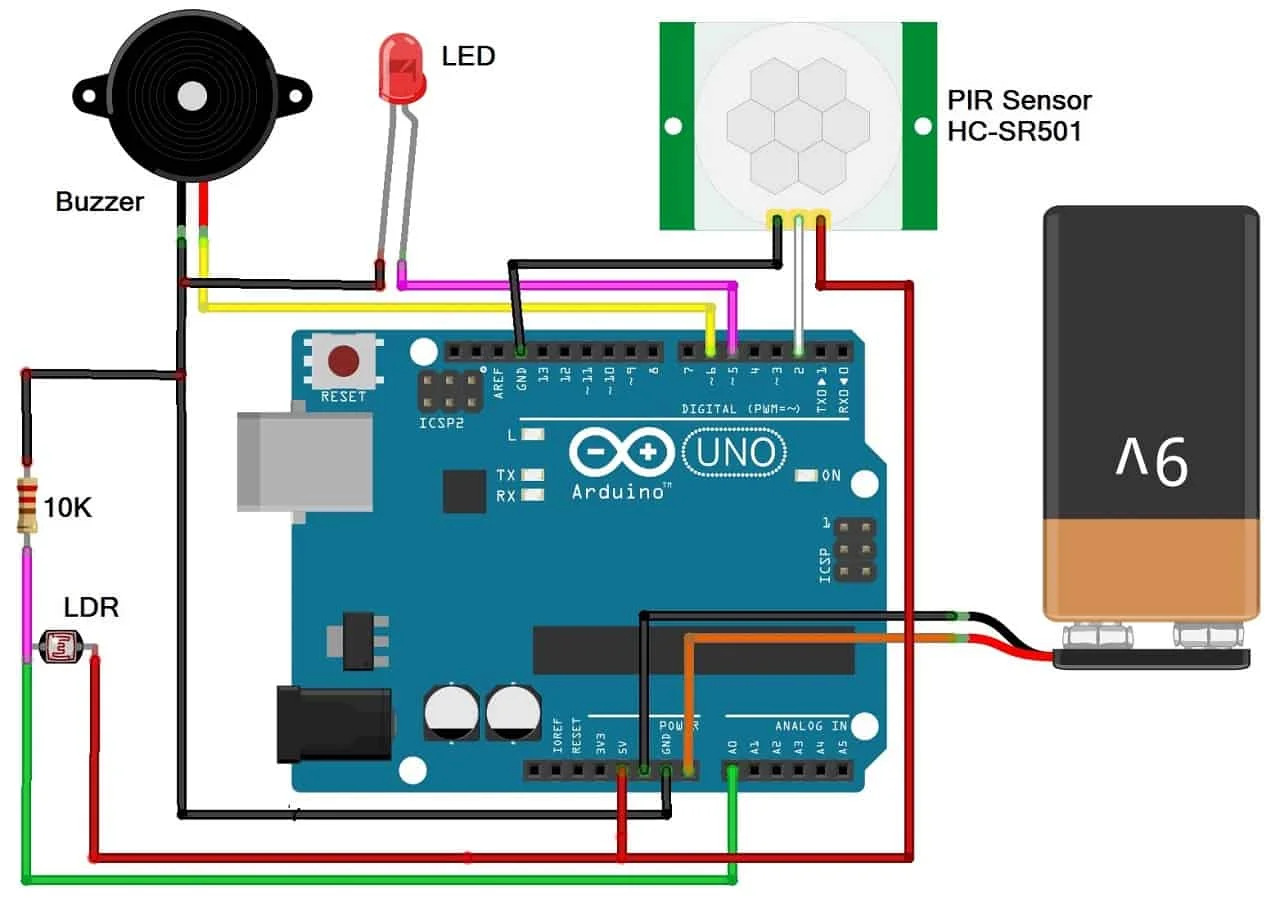
Motion sensors are crucial for detecting unauthorized movement within a secured area. Passive Infrared (PIR) sensors, common in Arduino projects, sense changes in heat signatures to identify motion. Incorporating these sensors enhances the effectiveness of home security by triggering alarms promptly when unexpected activity is detected.
Gathering Components and Tools
Essential Hardware List: Arduino, Sensors, and Accessories
To build your home security alarm, start with an Arduino Mega 2560 board, which offers ample input/output pins for multiple sensor integration. Include PIR motion sensors for movement detection and magnetic door switches to monitor entry points. Additional components like buzzers provide audible alarms, while an LCD display offers real-time status updates. A relay module can control external devices such as lights, enhancing your system’s functionality.
Software and Programming Tools Required
The primary software needed is the Arduino Integrated Development Environment (IDE), which supports writing, compiling, and uploading code. Beginners should familiarize themselves with basic C programming concepts before exploring C++ features to organize code better using classes. Access to libraries that support sensors and displays simplifies programming and improves efficiency.
Setting Up Your Arduino Environment
Installing the Arduino IDE
Download the latest version of the Arduino IDE from the official website and follow the installation prompts for your operating system. This setup ensures you have all necessary tools for writing and uploading sketches to your Arduino board. Setting up the environment correctly is vital to smooth project development and debugging.
Connecting Your Arduino Board to Your Computer
Use a USB cable to connect the Arduino Mega 2560 to your computer. The IDE will recognize the board, and you need to select the correct port and board type within the software. Proper connection ensures seamless code uploading and serial communication, which is essential during testing and monitoring phases.
Wiring the Motion Sensors and Alarm
Pin Configuration for Motion Sensors
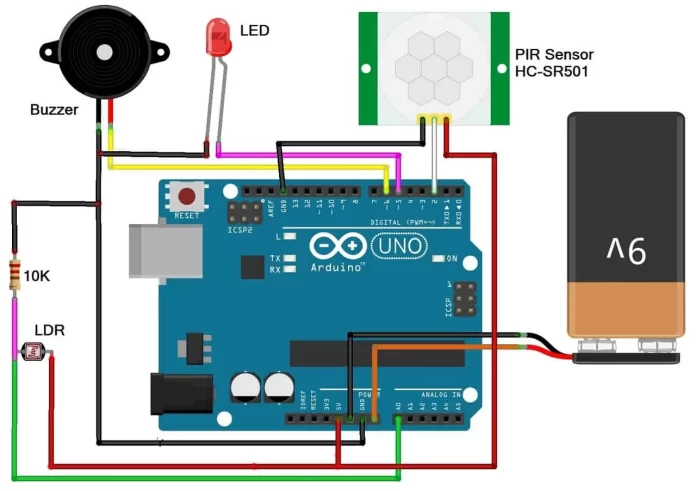
Attach PIR sensors to Arduino digital input pins, ensuring power and ground connections are secure. Position sensors in rooms and near entry points for maximum coverage. Accurate wiring prevents false triggers and guarantees reliable motion detection. Referencing a circuit diagram before assembling helps avoid wiring errors.
Integrating Buzzers and LED Indicators
Connect the buzzer to a digital output pin to emit loud alarms when motion is detected. LEDs can serve as visual indicators for system status—on, off, or triggered. Implementing these components provides immediate feedback and deterrence, enhancing the overall security effectiveness of your system.
Writing the Arduino Code for Motion Detection
Programming Basics for Beginners
Start by understanding the Arduino setup() and loop() functions, which initialize components and continuously check for sensor input, respectively. Use C++ classes to encapsulate sensor behavior, helping organize code logically. Include getter methods to access private variables safely and route outputs through member functions, promoting good programming practices.
Motion Detection Logic Explained
The code reads input from motion sensors and, upon detecting movement, activates the buzzer and updates the LCD display. Timing functions help manage alert duration and prevent false alarms. Using clear method names and structured logic simplifies troubleshooting and future expansion of the system.
Testing and Troubleshooting Your Security Alarm
Running Initial Tests
Before full installation, test your setup with a model house or controlled environment. Verify sensor responsiveness, buzzer sound, and display output. Testing helps identify any wiring mistakes or code issues early, ensuring the system performs reliably once deployed.
Common Issues and How to Fix Them
Common mistakes include attempting to access private class variables directly, skipping constructor initialization, or neglecting to define all class methods properly. Wiring errors like loose connections or missing ground references can cause unreliable sensor readings. Address these by carefully reviewing code structure, using appropriate member functions, and double-checking hardware connections.
Customizing Your Alarm System
Adding Multiple Sensors for Wider Coverage
Expand your system by incorporating additional PIR sensors and magnetic switches to monitor more areas simultaneously. The Arduino Mega 2560 supports numerous inputs, making it ideal for scalable security solutions. Strategically placing sensors increases detection accuracy and reduces blind spots.
Implementing Notification Alerts (SMS, Email)

Integrate IoT modules such as Wi-Fi or GSM shields to enable remote alerts via SMS or email. This feature offers real-time notifications regardless of your location, enhancing the system’s responsiveness. Incorporating cloud services or smartphone apps further improves monitoring convenience and security management.
Conclusion: Benefits of Building Your Own Security Alarm
Creating a DIY Arduino home security alarm equips you with a customizable, cost-effective solution tailored to your home’s unique needs. It fosters practical skills in electronics and programming while providing reliable protection. By combining motion sensors, alarms, and smart notifications, your system ensures peace of mind through real-time monitoring and rapid response capabilities.


