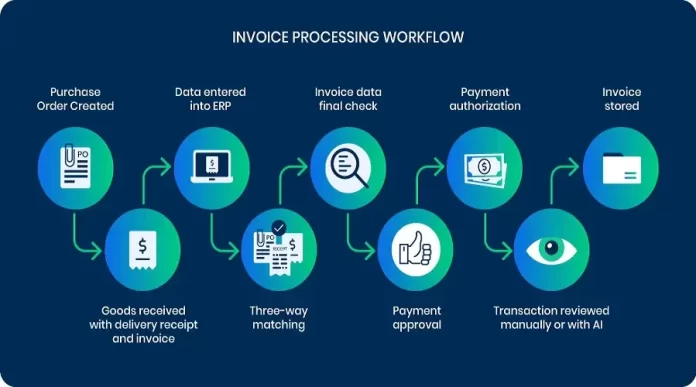

Why Invoice Processing Matters for Freelancers
Challenges Faced Without Automation
Imagine Sarah, a freelance graphic designer juggling multiple clients every month. Without automation, Sarah spends several hours each week manually entering invoice details from paper receipts and email attachments into spreadsheets. This tedious process often leads to errors like incorrect amounts or missed invoices, which create delays in payments. Manual routing of these invoices for client approval and keeping track of payment statuses through spreadsheets adds further complexity to her workflow.
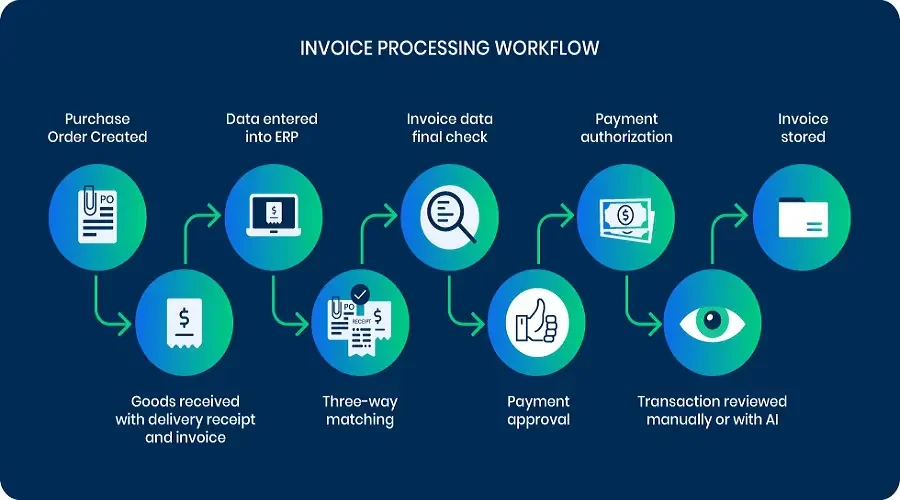
These challenges are common among freelancers who handle everything independently. Paper routing, manual data entry, and spreadsheet tracking are time-consuming and error-prone tasks that increase the effort and reduce accuracy in invoice processing.
Impact on Cash Flow and Productivity
For freelancers, timely payment is critical to maintaining steady cash flow to cover expenses and invest in their business. When invoice processing is slow or inaccurate, payments can be delayed, creating stressful cash crunches. For example, John, a freelance writer, once lost a significant client payment due to an incorrectly processed invoice that went unnoticed for weeks. This meant scrambling to cover his bills while waiting on a delayed payment.
Beyond cash flow, these manual processes steal valuable time away from core business activities such as marketing and project work. This reduced productivity ultimately affects growth potential and the freelancer’s bottom line.
Top Automation Tools Tailored for Freelancers
Overview of Popular Software Solutions
Freelancers now have access to a variety of automation tools designed to simplify invoice management without requiring complex integrations. For instance, QuickBooks Online offers seamless invoicing tightly integrated with accounting, allowing easy tracking of payments and expenses. Its user-friendly interface suits freelancers who prefer an all-in-one platform.
Another tool gaining popularity is Sai by Simular, an AI-native invoice automation solution that handles entire invoice workflows without needing APIs or complicated setups. This approach appeals to freelancers looking for hassle-free automation that can adapt to diverse invoice formats.
For those needing smarter invoice coding and approval workflows, tools like Stampli and Bill.com provide AI-assisted features that streamline coding, routing, and payment scheduling. These tools cater well to freelancers scaling up in complexity.
Key Features That Simplify Invoicing
Successful invoice automation tools often focus on high data extraction accuracy, typically between 95-99%, enabling them to process unstructured invoices, including those with unusual layouts or handwriting. This reduces the burden of manual review significantly. The ability to forward invoices directly via email attachments for automatic processing helps freelancers save time and avoid data entry errors.
Features such as preset approval thresholds—like flagging invoices above $5,000 for manual review—allow freelancers to maintain control while benefiting from automation. Platforms that operate through simple graphical user interfaces (GUI) rather than complex API setups are preferred, enabling easy adoption without technical expertise.
Step-by-Step Guide to Setting Up Automated Invoicing
Choosing the Right Tool Based on Freelance Needs
Consider Mia, a freelance web developer processing around 30 invoices monthly. She starts by evaluating automation platforms focusing on volume capacity and integration capabilities. Since she works mostly with US clients, QuickBooks Online fits well due to its native accounting integration and affordability for small volumes.
In contrast, if a freelancer expects to scale or work with international clients, tools like Tipalti, which supports global payment methods and comprehensive accounts payable automation, might be preferable. The evaluation should also include comparing data extraction accuracy, approval workflow flexibility, and total cost of ownership, including subscription fees and transaction costs.
Integrating Tools With Payment Gateways
Integration with payment gateways is crucial for a streamlined payment process. Freelancers should connect their automation software with platforms like PayPal, Stripe, or bank transfer services to enable automated payment scheduling. For example, after automating invoice approval in Bill.com, payments can be scheduled directly, eliminating manual bank reconciliation headaches.
Clear instructions and standardized formats when forwarding invoices via email enhance tool accuracy. Additionally, cross-referencing vendor data against a master list stored in a Google Sheet can improve data consistency across systems, preventing errors during ledger entry or payment processing.
Benefits of Automation Beyond Time Savings
Error Reduction and Improved Accuracy
One significant benefit of automation is the reduction of human error. Freelancers no longer need to worry about mistyping invoice numbers, misplacing receipts, or overlooking payment due dates. Automated tools handle complex cases like handwritten invoices or multi-currency international bills with high precision, using AI models that adapt dynamically to new vendor formats.
For example, Alex, a freelance consultant, used to spend hours reconciling invoices against payments, but after adopting an AI-enabled tool, his error rate dropped dramatically, and his reporting became more reliable. This accuracy helps maintain trust with clients and reduces the need for time-consuming corrections.
Professionalism and Client Satisfaction
Automated invoicing systems send out timely, consistent, and accurate invoices, reflecting professionalism that clients appreciate. These systems also provide clients with transparent approval workflows and status updates, reducing back-and-forth communication. Freelancers who automate invoicing often report improved client relationships and on-time payments due to the reliable and consistent billing process.
Potential Pitfalls and How to Avoid Them
Common Mistakes When Automating Invoices
Relying exclusively on traditional OCR systems can backfire as they typically require manual review for 15-25% of invoices due to formatting variations or handwritten notes. This partially defeats the purpose of automation by still demanding time-consuming manual intervention.
Moreover, neglecting to implement and configure robust approval workflows and exception handling can delay invoice processing and introduce bottlenecks. Several freelancers have faced challenges when the automation tool did not integrate well with their accounting system, resulting in duplicate data entry or inconsistent records.
Another frequent error is underestimating total costs, including hidden subscription fees and implementation overhead. Freelancers should assess all expenses upfront to avoid surprises that affect profitability.
Data Security and Privacy Considerations
With financial data being highly sensitive, freelancers must choose automation tools with strict data security and privacy policies. Tools that operate without requiring complex API setups often reduce security risks by minimizing integration points. Additionally, freelancers should verify compliance with data protection regulations such as GDPR when working with international clients.
Regularly updating vendor master lists, using encrypted communication channels for invoice forwarding, and restricting access to sensitive financial systems are practical steps to safeguard information throughout the invoice automation process.
Measuring the ROI of Invoice Automation for Freelancers
Time Saved Versus Costs Incurred
To understand whether invoice automation is worthwhile, freelancers should track the hours previously spent on manual billing tasks and compare them to automation costs. For example, if Emma spent 10 hours monthly on invoicing and her time is valued at $40/hour, the $150 monthly subscription for an AI-native tool seems justified as she saves both time and the frustration of errors.
It’s important to factor in less tangible benefits such as reduced stress and improved business reputation, which can lead to better client retention and additional referrals.
Improvement in Payment Timeliness
Automation often accelerates invoice processing and approval, leading to faster payments. Freelancers report that clients are less likely to delay payments when invoices are clear, professional, and come with transparent approval workflows. Tracking days sales outstanding (DSO) before and after automation implementation offers a concrete metric to assess improvement.
For instance, a consultant noticed a reduction from 30 to 15 days in payment receipt time after automating invoice routing and reminders, significantly improving her cash flow stability.


