

Introduction to State Management in Vue.js
Understanding State in Large-Scale Applications
Managing state in Vue.js applications is straightforward when you’re dealing with a small project. However, as applications grow in complexity and size, handling the state becomes an intricate task. In large-scale Vue.js apps, state refers to the data that drives your application’s behavior, UI updates, and user experience. This data often needs to be shared across multiple components, views, and modules, making its management crucial to maintaining a clean and efficient codebase.

At its core, state management helps synchronize data between various parts of your application seamlessly. It ensures that when one piece of state changes, every component depending on it reflects that change without manual intervention. Getting this right is fundamental to smooth, bug-free user interactions and long-term maintainability.
Challenges of State Management at Scale
As your Vue.js application expands, several challenges surface. One common issue is the shared state scattered across multiple components which leads to complexity and potential duplication. This often results in what’s known as prop drilling—passing props through layers of components just to reach the ones that need the data. It quickly becomes tedious and error-prone.
In addition, developers might try synchronizing state changes via emitted events or template references, causing brittle and unmaintainable code. Without centralized control, any component could mutate the state arbitrarily, leading to hard-to-track bugs and inconsistent UI states. This problem only worsens when server-side rendering (SSR) is involved, since singleton stores can inadvertently share state across user requests, leading to unpredictable behavior.
Poorly structured code and absence of modularity make debugging and scaling the project a nightmare. Teams struggle with collaboration when the project lacks a consistent organization pattern, and initial load times can suffer when lazy loading or code splitting isn’t implemented. Managing state effectively is not just about data, but about ensuring the entire application remains performant and maintainable.
Choosing the Right State Management Strategy
Vuex vs. Alternatives: Pinia and Others
Traditionally, Vuex has been the go-to solution for Vue.js state management. It offers a well-defined pattern for managing global state with mutations, actions, and getters. However, Vuex is now in maintenance mode, and newer alternatives like Pinia provide a more modern, flexible, and developer-friendly approach.
Pinia shines with its simpler API, built-in support for the Vue 3 Composition API style, and excellent TypeScript integration. It also comes with enhanced tooling support via Vue DevTools and handles SSR scenarios more gracefully. For new large-scale projects, Pinia is generally the better choice due to these advantages.
That said, for simple cases or smaller apps, relying on local component state or Vue’s reactive APIs like reactive(), ref(), or composables can be sufficient. Extracting shared state upwards to a common ancestor component to manage it there might solve the problem without the need for a full-fledged store.
When to Use Local State vs. Global State
Deciding what state belongs locally within components and what should be global is key. Local state works well for UI-specific data, such as form inputs or toggles that don’t affect the broader app context. As soon as state affects multiple components or views, it’s time to lift it out to a global store.
For instance, user authentication status, shopping cart contents, or theme preferences are classic candidates for global state. Managing this globally avoids prop drilling and inconsistent data across the app. However, it’s important to avoid turning your store into a catch-all that every component uses arbitrarily. Effective organization and clear module boundaries can prevent this.
Architecting State for Scalability
Modularizing State with Vuex Modules
One proven approach for managing large applications is modularizing your state management. Instead of one monolithic store, Vuex supports dividing the state into modules, each with its own state, mutations, actions, and getters. This separation aligns with different features or domains of the app.
Pinia naturally encourages modular design by allowing multiple store instances that can be organized by functionality. This modularization improves maintainability, as teams can work on distinct modules independently and with greater clarity about where state changes belong.
Structuring State for Maintainability and Readability
Beyond just modularization, fully structuring your app to maintain readability is essential. Group components by feature or domain, placing related components in dedicated folders and subfolders. This approach avoids scattered components and helps new developers quickly locate code.
Similarly, organize your store files in a way that corresponds to app sections, separating state management logic from UI components. Within stores, use clear naming conventions for state variables, getters, and actions to signal their purpose. This disciplined structure fosters easier debugging, better scalability, and more efficient teamwork.
Best Practices for Async State Handling
Using Actions and Getters Effectively
When handling asynchronous operations, such as fetching data from an API, actions play a critical role in the store. Actions allow you to perform async work, then commit mutations to update the state. This separation keeps your mutations synchronous and simple, while actions handle the complexity.
Getters are perfect for computing derived state dynamically. For example, filtering, sorting, or aggregating data from your base state. Using getters ensures that your components remain lean and focused on presentation, while the store handles data transformation logic in a centralized and reusable manner.
Managing API Calls and Loading States
Loading states and error handling are important aspects often overlooked. Each async action should update the store to reflect whether data is being loaded or if an error occurred. This can be achieved by including state properties like isLoading or error alongside the main data.
Consistently managing these states helps provide users with feedback, such as loading spinners or error messages, and makes your app feel more responsive and reliable. Furthermore, adopting this pattern improves maintainability by standardizing async workflows across your app.
Performance Optimization Tips
Lazy Loading State Modules
To prevent your application from becoming sluggish at startup, implementing lazy loading for state modules and routes is crucial. Dynamic imports allow you to load parts of your store only when needed, reducing initial bundle sizes and improving load times.
Lazy loading also benefits SSR scenarios by keeping server response times lower and client hydration faster. Organize your app routes by sections, and combine route-based code splitting with store module lazy loading to maximize performance gains.
Memoization and Computed Properties in State Management
Memoization through computed properties or getters avoids unnecessary recalculations when the underlying state remains unchanged. Vue’s reactivity system efficiently tracks dependencies, ensuring computed state updates only when relevant data changes.
Using this capability within your stores not only optimizes rendering but also reduces the complexity of components by moving derived logic out of them. This balance between reactivity and memoization directly translates into smoother UX and optimized resource usage.
Debugging and Testing Vue.js State
Using Vue Devtools for State Inspection
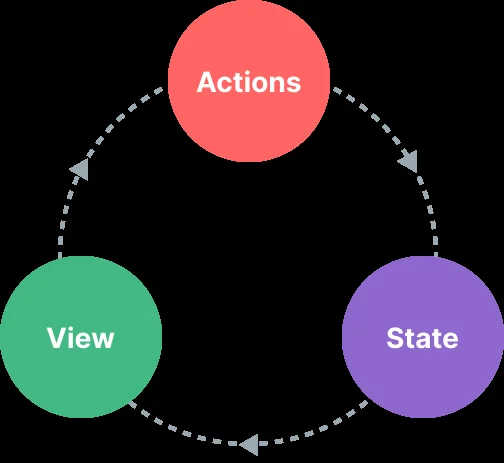
Vue Devtools is an invaluable tool for inspecting and debugging your app’s state. It lets you explore the current state tree, track mutations and actions in real-time, and even time-travel through changes. Pinia offers enhanced integration making state inspection more intuitive.
Getting comfortable with Vue Devtools early will save time diagnosing issues and understanding state flow. Pay attention to method calls in templates, ensuring you use parentheses (like store.increment()) to avoid bugs related to incorrect this context.
Writing Unit Tests for Vuex Stores
Testing your state logic independently from UI components is essential for reliable software. Write unit tests for your stores by focusing on mutations, actions, and getters. Mock API calls in actions to simulate different scenarios, including successful responses and errors.
Clear separation between state logic and UI allows tests to run faster and uncover subtle bugs. Also, well-tested stores build confidence during refactoring or scaling, making your project more resilient to change.
Real-World Case Studies
Scaling State in Enterprise Vue.js Applications
Enterprise-level Vue.js applications often manage thousands of components and multiple teams working simultaneously. Success stories emphasize strict modularization of state, combined with thoughtful folder structures and consistent coding conventions.
One common practice is to use Pinia with clearly defined store modules for each business domain. Routes and components are grouped by feature, and lazy loading is leveraged extensively. Regular code reviews and the use of Devtools help maintain code health and performance.
Lessons Learned from State Management Pitfalls
Many large projects fail or become hard to maintain due to ignoring state management best practices. Common pitfalls include overusing prop drilling, relying on fragile event or ref-based synchronization, and not using centralized state logic.
Ignoring modularity and clear organization leads to sprawling codebases that slow development. Neglecting optimizations such as lazy loading sacrifices performance. Lastly, sticking with outdated tools like Vuex in new projects often causes unnecessary friction.
The key takeaway is to think holistically about state management—from planning its structure and flow to choosing the right tools and testing. This mindset ensures your Vue.js application remains robust and scalable, even as complexity grows.


