
Introduction to Task Automation in Customer Support
Defining Task Automation
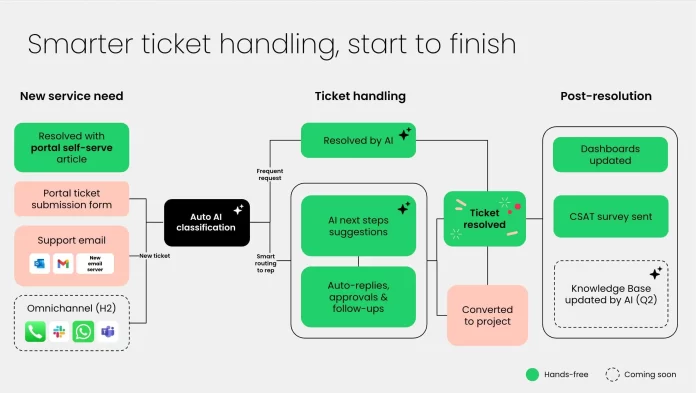
Task automation in customer support refers to the use of technology to streamline repetitive and time-consuming processes involved in managing support tickets. Instead of agents manually sorting, assigning, and responding to requests, automation tools handle these tasks systematically. This includes creating tickets from various channels, categorizing and prioritizing issues, routing them to the right teams, and even delivering instant responses when possible. By automating routine tasks, support teams can focus on solving more complex problems and engaging meaningfully with customers.
Importance for Modern Customer Support Teams
In today’s fast-paced business environment, customer expectations for quick and efficient support are higher than ever. Support teams face an overwhelming volume of tickets from multiple communication channels—emails, chats, web forms, and social media—often without sufficient integration. This can lead to long delays, missed messages, and customer frustration. Task automation is vital for modern support teams to keep pace with demand and maintain high service standards. It reduces manual workload, accelerates response times, and helps maintain consistent quality in support interactions.
Challenges in Traditional Customer Support Ticket Management
Common Bottlenecks and Pain Points
Manual ticket management can quickly become chaotic as requests pour in from all directions. Agents often waste valuable time just organizing tickets before they can address the actual problems. Sorting through emails, assigning the right priority, and determining which team member should handle each issue slows down the entire process. As ticket volumes grow, this approach becomes unsustainable, creating bottlenecks and backlogs.
Additionally, repetitive and straightforward issues take up a disproportionate amount of agent attention. This not only drains productivity but also delays responses for customers with more complex concerns. The pressure intensifies in hybrid or remote work environments where communication across dispersed teams may lack cohesion, further complicating ticket tracking and resolution.
Impact on Customer Satisfaction and Team Efficiency
When support ticket handling is slow and inconsistent, customer satisfaction noticeably suffers. Delays, lost tickets, and unclear communication frustrate users and can damage loyalty. On the flip side, support teams may feel overwhelmed and demotivated by the sheer volume of repetitive tasks and inefficiencies involved. This leads to burnout and higher turnover, creating a vicious cycle that further hampers performance. Without automation, maintaining agreed-upon service levels becomes challenging, eroding trust from both customers and internal stakeholders.
Key Automation Tools and Technologies
Overview of Popular Automation Software
Several automation platforms have emerged to meet the needs of modern customer support teams. These tools go beyond simple ticket logging to offer intelligent ticket routing, priority management, and real-time status tracking. Many incorporate artificial intelligence and machine learning capabilities to analyze ticket data and continuously optimize workflows. Automated responses acknowledge customer inquiries instantly, even outside of business hours, maintaining engagement around the clock.
Some leading solutions feature visual workflow builders that require little to no coding, making it easier for teams to define routing rules, escalation paths, and automation triggers. AI-powered systems can even handle common issues autonomously, such as password resets or FAQs, freeing agents from routine tasks. The result is faster ticket resolution, improved SLA compliance, and more efficient resource use.
Integration with Existing CRM and Support Platforms
One key to successful task automation is seamless integration with existing CRM and customer support infrastructures. Automated ticketing systems that connect to customer databases, communication channels, and knowledge bases provide agents with richer context and reduce duplicated efforts. Integration allows for a centralized view of customer interactions, enabling personalized support and reducing the need for customers to repeat information.
Moreover, syncing automation platforms with CRM data means tickets can be prioritized based on customer value, previous interactions, or urgency defined by business rules. Integrations also enable real-time updates, alerting both customers and agents when tickets progress or when SLAs are at risk. This connectivity transforms task automation from a standalone feature into a core component of an efficient support ecosystem.
Step-by-Step Guide to Implementing Task Automation
Assessing Current Support Workflows
Begin by thoroughly analyzing how your support team currently handles tickets. Map out each step from receiving requests to final resolution, identifying manual handoffs, delays, and repetitive tasks. Understanding the pain points and volume patterns is essential to determine where automation can have the greatest impact. Involving frontline agents in this assessment helps uncover practical challenges and improvement opportunities.
Identifying Automation Opportunities
Once existing workflows are clear, pinpoint tasks that can be automated without compromising service quality. Routine actions like ticket creation, categorization, simple triage, and status updates typically present the best opportunities. Look for repetitive questions or common issues that AI-driven systems might handle independently. Also consider automation to enforce SLA compliance and trigger alerts before deadlines are missed.
Setting Up Automated Ticket Routing and Prioritization
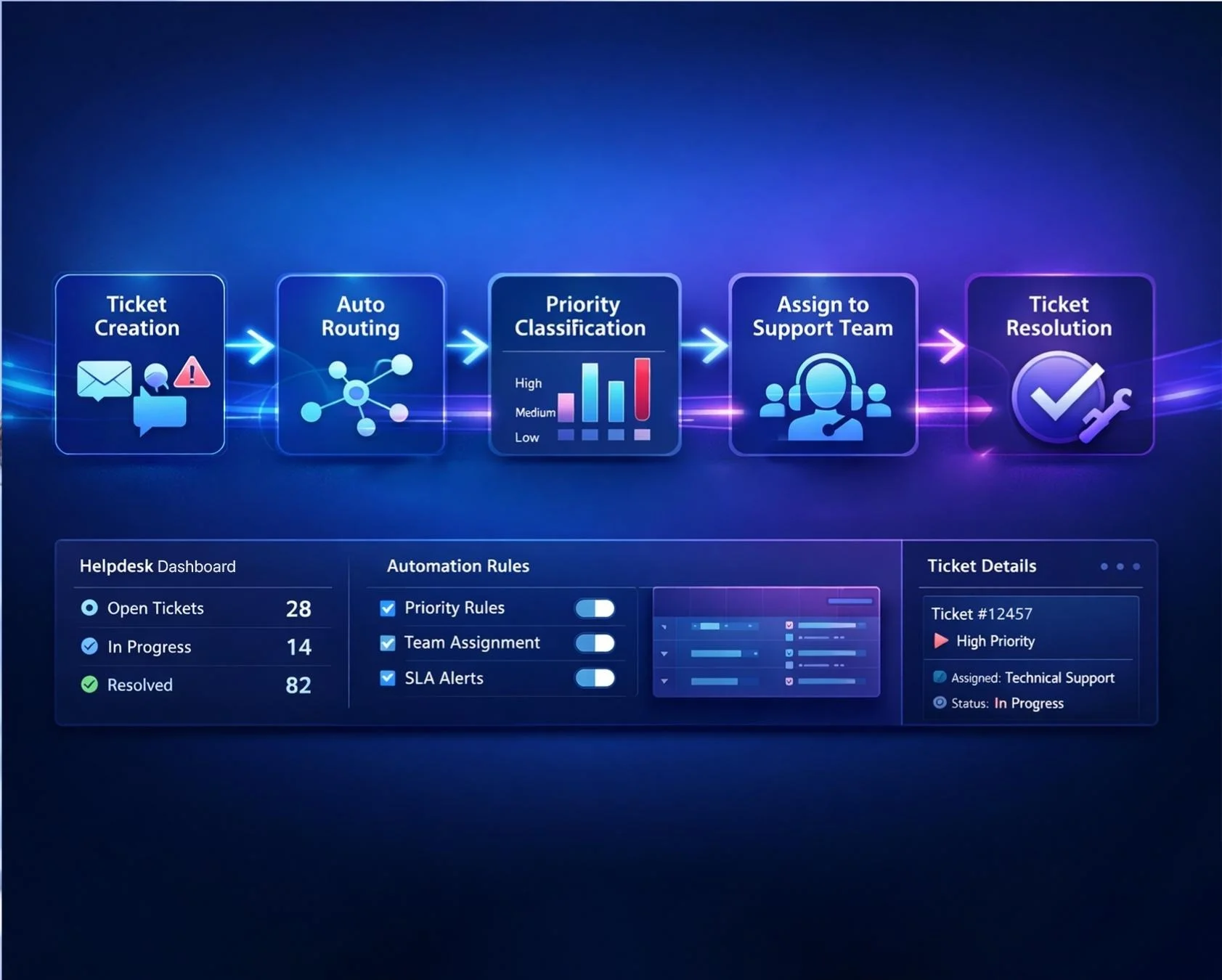
Next, configure your automation software to assign incoming tickets automatically based on predefined rules. Routing can consider factors such as ticket category, customer priority, message keywords, or product involved. Prioritization should reflect urgency and resource availability, ensuring critical issues are addressed promptly. Modern platforms often include drag-and-drop interfaces to define these rules plainly, enabling quick adjustments as workflows evolve.
Using AI for Response Suggestions and Follow-ups
Advanced automation leverages AI not only to route tickets but also to assist agents with suggested responses and recommended next steps. This support can speed up resolution times and improve consistency. Some AI tools even generate automatic follow-ups or status updates, keeping customers informed without manual effort. These features enhance the customer experience while allowing agents to dedicate their skills to complex problem-solving.
Measuring the Impact of Automation on Support Performance
Important KPIs to Track
To evaluate how automation improves your support operation, monitor key performance indicators regularly. Response time and resolution time are critical metrics that reflect efficiency gains. Tracking ticket backlog and SLA compliance sheds light on workload management and service reliability. Customer satisfaction scores and first-contact resolution rates help assess the impact on service quality. Collecting these insights enables data-driven refinement of automation rules and workflows.
Case Studies Demonstrating Efficiency Gains
Many organizations have successfully transformed their support teams by adopting task automation. For example, companies report reducing average ticket handling times by up to 40% after implementing AI-powered routing and automated responses. Others highlight improvements in SLA adherence and customer satisfaction scores as manual bottlenecks disappear. These successes underscore the tangible benefits of automation in scaling support operations sustainably while maintaining a human touch.
Potential Pitfalls and How to Avoid Them
Over-automation Risks
While automation offers significant advantages, over-reliance on technology can backfire. Excessive automation may frustrate customers who feel trapped in impersonal, scripted interactions or face delays when issues require human judgment. It’s vital to balance automation with genuine human support, especially for complex or sensitive cases. Designing escalation paths that smoothly transfer tickets from AI tools to skilled agents helps avoid alienating customers.
Ensuring Human Oversight and Quality Control
Automation should augment—not replace—human expertise. Establish protocols for ongoing oversight of automated processes to detect errors, misrouted tickets, or emerging patterns the system might miss. Regularly review AI training data and rules to keep them aligned with evolving customer needs and business changes. Maintaining quality control ensures automation enhances support effectiveness without sacrificing empathy or accuracy.
Future Trends in Customer Support Task Automation
Advancements in AI and Machine Learning
The future of customer support automation is closely tied to advances in artificial intelligence and machine learning. These technologies will continue to improve understanding of natural language, allowing AI to handle more complex requests and provide increasingly personalized assistance. Self-learning systems will adapt dynamically to new issues and customer behaviors, reducing the need for manual rule updates.
Predictive Support and Proactive Customer Engagement
Emerging trends include predictive support, where AI anticipates customer problems before they arise based on historical data and usage patterns. Proactive engagement tools will automatically reach out to customers with relevant solutions or updates, minimizing the need for inbound requests. This shift from reactive to proactive service promises to revolutionize support, making it more efficient and customer-centric.


