
Introduction to Secure File Uploads in Full Stack Development
Why Security Matters in File Uploads
File uploads are a common feature in many web applications, allowing users to share documents, images, and other data. However, this seemingly simple functionality introduces significant security risks if not handled correctly. Uploaded files can contain malicious code, viruses, or scripts that, when executed, compromise the server or users. Therefore, secure handling of file uploads is essential to protect both the server environment and the integrity of the application.
Ensuring security in file uploads also safeguards sensitive user data and prevents unauthorized access. Without proper precautions, attackers might exploit vulnerabilities to upload harmful files, which could lead to data breaches, defacement, or denial-of-service attacks.
Overview of Express and React in Handling File Uploads
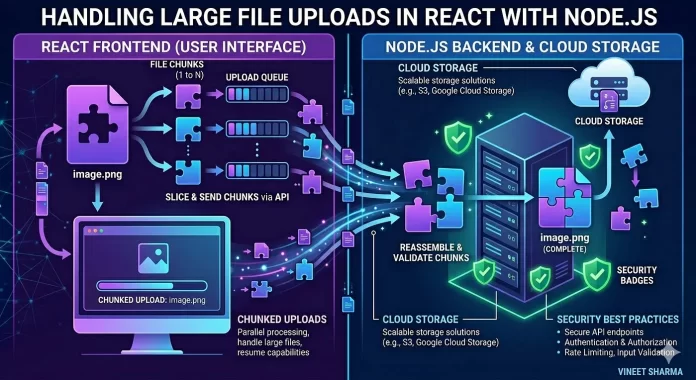
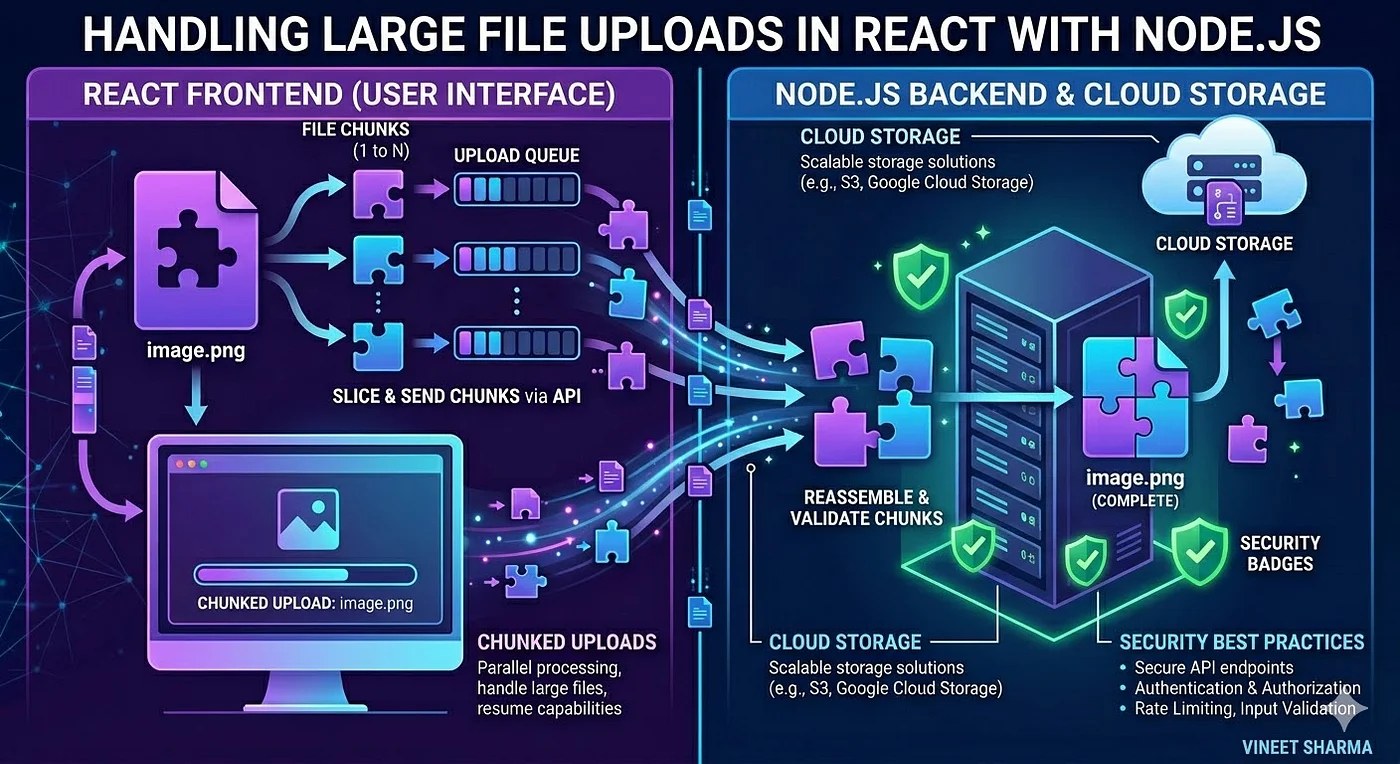
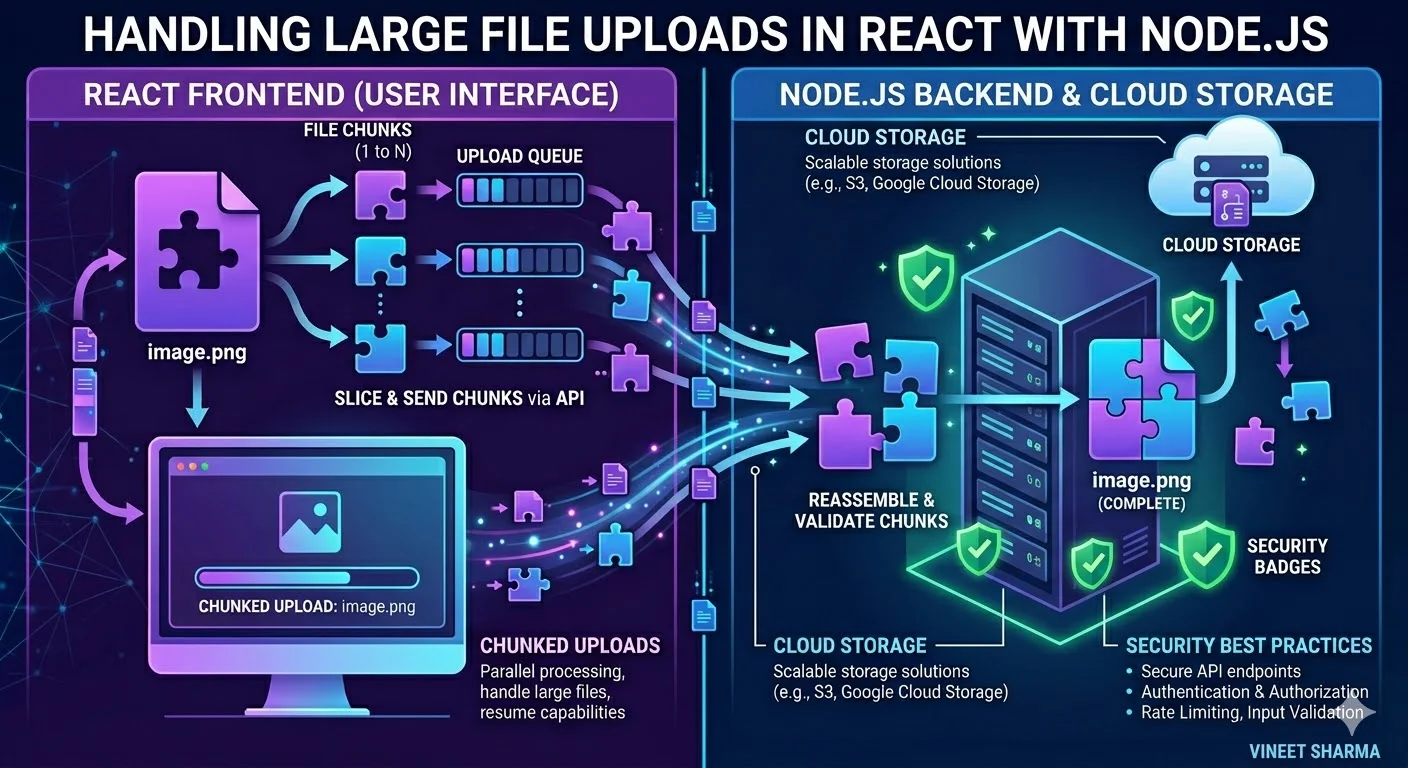
Express and React provide a powerful combination for implementing file uploads within a full stack web application. Express, a minimal and flexible Node.js framework, excels in building robust backend APIs and managing file storage on the server. With its middleware capabilities, Express can easily integrate libraries like Multer to handle multipart form data efficiently, ensuring secure processing and storage of files.
On the frontend side, React offers a dynamic and responsive user interface for file selection and upload. It provides a seamless experience by facilitating real-time feedback such as upload progress or validation errors. Together, Express and React allow for a well-structured, secure, and user-friendly file upload system.
Setting Up Your Full Stack Environment
Configuring Express Backend for File Uploads
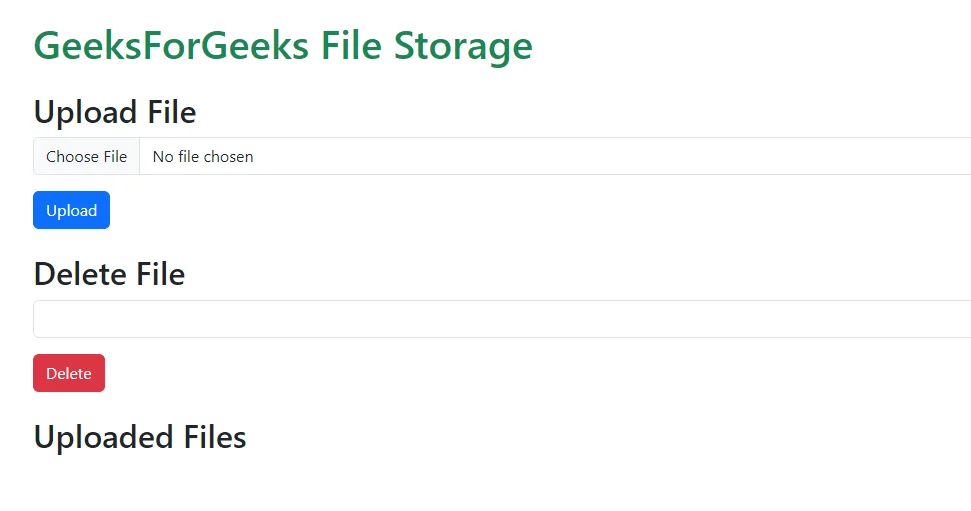
To start, you need to establish an Express backend capable of handling file uploads securely. Begin by installing essential packages like express, multer, and ejs. Multer acts as middleware to parse incoming multipart form data, making it straightforward to manage uploaded files.
Set the view engine to EJS and organize your views folder to render pages elegantly. Create a dedicated folder, such as /filestorage, to store uploaded files and configure Express to serve this directory statically. This setup ensures files are accessible securely through URLs.
Next, define routes to handle various operations: uploading files, viewing uploaded content, and deleting unwanted files. When implementing upload functionality, customize Multer’s diskStorage option to control the destination and rename files accordingly, helping to avoid overwriting or security risks associated with user-supplied filenames.
Implementing File Input and Upload UI in React
On the React side, create a file input component that allows users to select files from their device. Use controlled components to manage state and validate file inputs before submission. Incorporate a form with the required enctype='multipart/form-data' attribute to ensure proper encoding of the files during transfer.
Implement upload functionality using the Fetch API or Axios to send files to the Express backend asynchronously. Enhance user experience by showing progress indicators, and dynamically update the UI to display the list of uploaded files. Employ Bootstrap and FontAwesome to style the form and provide intuitive icons, creating an appealing and user-friendly interface.
Best Practices for Secure File Uploads
Input Validation and Sanitization Techniques
A vital step in secure file uploads is validating and sanitizing user inputs. Before processing any uploaded file, confirm that the input matches expected criteria to prevent injection attacks or malformed data. Sanitize filenames to remove dangerous characters or patterns that could lead to directory traversal or overwrite critical files.
This validation extends beyond filenames; check metadata, file size, and content where possible. Sanitization also involves normalizing file extensions and removing non-standard characters. These practices mitigate risks tied to malicious file names and help maintain the integrity of the storage system.
File Type Restrictions and Whitelisting
It is crucial to limit the types of files accepted during uploads through strict whitelisting. Only allow specific and safe file formats, such as images (JPEG, PNG), PDFs, or other predefined file types relevant to your application. This restriction minimizes the chance of users uploading executable files or scripts that could be harmful.
Implement these checks both on the client and server sides to avoid bypasses and ensure compliance. Confirm the file’s MIME type and extension during the upload process, rejecting any files that do not meet defined criteria.
Limiting File Size to Prevent Overloads
Large file uploads can slow down the server or lead to denial-of-service conditions. Limit the maximum file size that users can upload to prevent resource exhaustion. Multer and Express configurations allow you to specify size limits easily, providing immediate feedback to users when they attempt to upload files that exceed the allowed size.
Enforcing size limits ensures stability of the application and controls storage usage, preventing unwanted strain on server infrastructure.
Handling File Storage Safely
Choosing Between Local and Cloud Storage
Deciding where to store uploads is a critical consideration. Local storage, such as saving files in a server directory, is simple and fast to set up but requires careful management of file permissions, backups, and security measures.
Alternatively, cloud storage services like AWS S3 or Google Cloud Storage offer scalable, reliable, and secure environments for file management. They often come with built-in encryption and access controls, reducing the risk of data loss or unauthorized access. Depending on your application’s scale and requirements, you may choose either approach or a hybrid model.
Saving Files with Unique and Safe Names
To avoid conflicts and security issues, save files with unique, sanitized names. Instead of using original filenames directly, generate unique identifiers using timestamps, UUIDs, or hash functions combined with the original extension. This approach prevents overwriting existing files and limits exposure to directory traversal attacks.
Customizing the naming convention through Multer’s diskStorage configuration enhances file management and tracking, ensuring every upload remains distinct and secure.
Protecting Against Common Vulnerabilities
Preventing Malware Uploads
Malware uploaded via files poses a serious threat. To counteract this, integrate virus scanning or malware detection at the upload stage, either through third-party services or specialized libraries. Additionally, enforce strict file type and size restrictions and thoroughly validate file content to minimize risks.
Implementing these measures helps detect and block dangerous files before they harm your system or users.
Mitigating Cross-Site Scripting (XSS) Through File Uploads
Attackers sometimes upload files containing malicious scripts designed to execute in a user’s browser, leading to cross-site scripting attacks. Prevent this by ensuring uploaded files are served with appropriate content-type headers and are not executed as scripts.
Also, avoid rendering user-uploaded content directly in your application without proper escaping. Sanitizing filenames and controlling what content users can upload are critical safeguards against XSS.
Using Content Security Policies
Content Security Policy (CSP) is a powerful browser-level security feature that restricts the sources from which scripts, styles, and other resources can be loaded. By configuring CSP headers properly, you can minimize the impact of malicious file uploads and reduce the risk of injection attacks.
Implementing CSP adds an extra layer of defense, complementing secure upload handling and safeguarding your application’s interaction with uploaded content.
Implementing Security Features in Express Middleware
Using Multer for Secure File Handling
Multer simplifies handling multipart/form-data in Express but requires careful configuration for security. Use Multer’s diskStorage to define safe paths and control file naming conventions. Moreover, include file filter functions to validate type and size before saving files.
Always ensure that Multer rejects files that don’t meet criteria immediately, preventing unnecessary processing or storage of harmful uploads. Multer also helps by automatically handling file streams, reducing code complexity around file management.
Custom Middleware for Additional Security Checks
Beyond Multer, develop custom middleware to add extra security validations. For instance, check for sanitized filenames, scan files using antivirus tools, or log upload activities for monitoring. Middleware can also handle errors gracefully, returning meaningful responses without revealing sensitive backend details.
This layered approach enhances security by covering gaps Multer alone might not address and ensures your Express server robustly manages file uploads.
Enhancing User Experience with Secure File Uploads
Progress Bars and Upload Feedback in React
While security is paramount, a smooth user experience encourages adoption and trust. Implement upload progress bars in React to visually indicate file transfer status. Feedback mechanisms help users understand the state of their upload, especially for larger files.
Provide immediate validation messages if the selected file is invalid or too large. This interactivity reduces frustration and prevents unsuccessful uploads from being submitted.
Handling Errors and Exceptions Gracefully
Anticipate and manage errors both on client and server sides. When uploads fail due to network issues, file type restrictions, or storage errors, inform users clearly with actionable messages. Use React’s state management to update the UI accordingly and allow retry operations.
On the Express backend, handle exceptions carefully to avoid crashes or security leaks. Logging errors while responding with sanitized messages maintains stability and security.
Conclusion: Balancing Usability and Security in File Uploads
Secure file uploads in full stack development require meticulous attention to both technical and user experience aspects. By leveraging Express with Multer and React for the frontend, developers can build efficient, elegant, and safe file upload systems.
Implementing thorough validation, sanitization, file restrictions, and storage controls helps protect applications from common vulnerabilities. Meanwhile, maintaining a responsive and informative UI ensures users can interact with the functionality confidently.
Ultimately, balancing security measures with usability leads to robust, trustworthy applications that safeguard data while serving user needs effectively.


